Settings
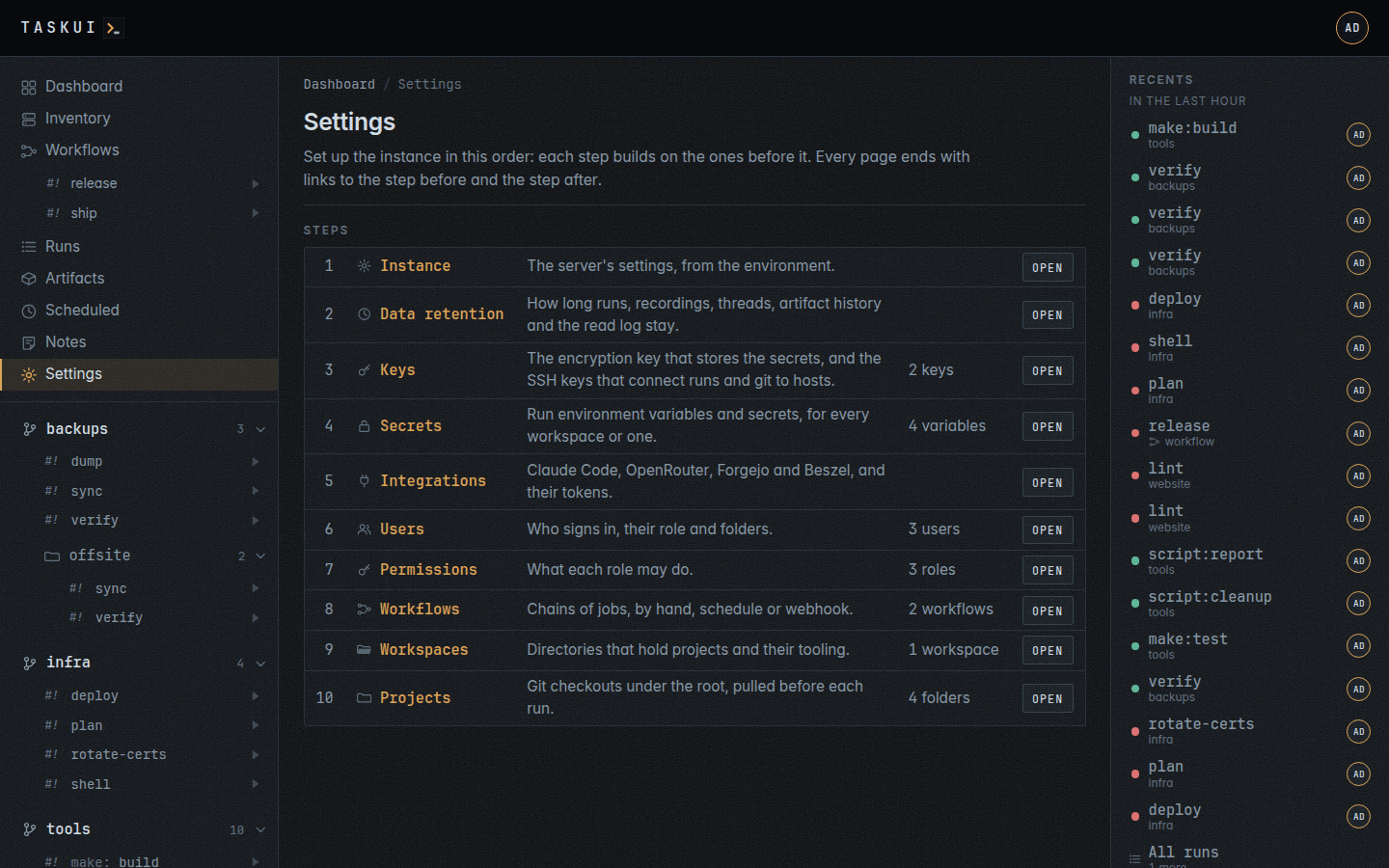
Not in the sidebar but in the user menu, behind your initials in the header, for whoever holds Allow View on any of its sections: Workspaces, Projects, Instance Keys, Secrets, Integrations or Users. It holds what the instance brings to every run. The page lists the steps in the order you set up an instance, numbered, and each step’s page ends with a footer: Previous on the left, Next on the right, and the steps between them as links, with the current one in bold. A step’s sub-pages, such as a key’s grants, a user’s profile or a project’s settings page, end with the footer of their step. The trail lists only the steps you may open.
- Instance: what the server runs with.
- Data retention: how long the instance keeps what it records.
- Telemetry: what the instance records of its own requests.
- Keys: the encryption key and the SSH keys.
- Secrets and env, on the instance’s encryption key.
- Integrations: Claude Code, OpenRouter, Forgejo and Beszel.
- Users: who may sign in.
- Permissions: what each role may do.
- Workflows: chains of jobs.
- Workspaces: directories of a home and projects under src.
- Projects: the folders under the root.
- Sidebar: the order of the sidebar, and what it leaves out.
Instance
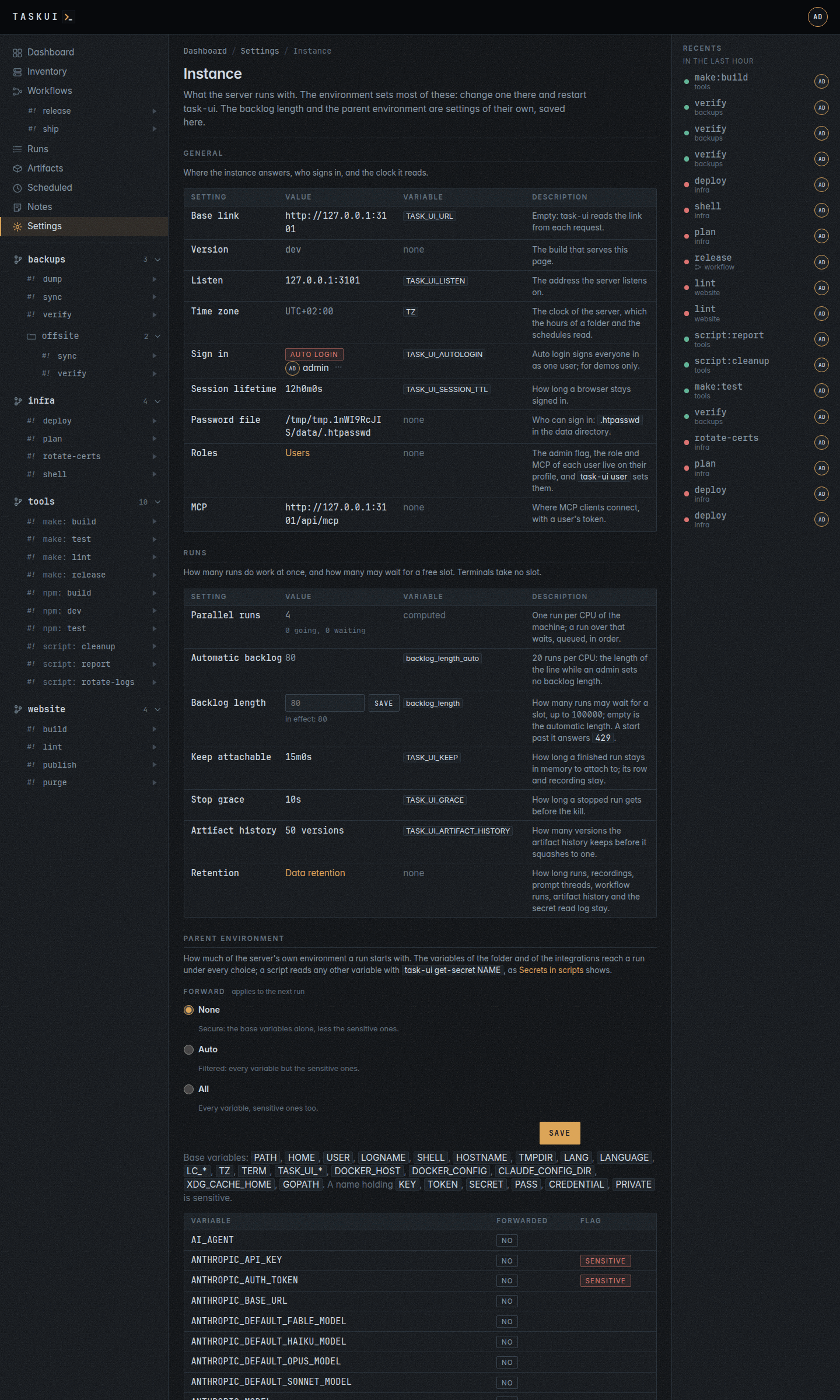
/settings/instance shows what the server runs with, in sections, each a table of the setting, its value, the variable that sets it and what it does:
- General: the base link (
TASK_UI_URL), the version, the listen address, the time zone of the server’s clock, how users sign in, the session lifetime, the password file, the roles and the MCP endpoint. - Runs: the runs that go at once, the backlog of runs that wait for a slot, how long a finished run stays attachable, the stop grace, the artifact history and a link to Data retention.
- Parent environment: how much of the server’s own environment a run starts with, and, for an admin, the server’s variables by name.
- Paths: the workspace folder, discovery, the data folder and how the host sees it, the key folder and the compose project.
- Storage, for an admin: what the instance keeps on disk, an item a row with its place, its size and its files, and a total: the database with its journal, the recordings, the artifacts, the tool history of each workspace’s home and the instance’s own copy, and the checkouts under each workspace’s
src. The instance measures it now and then and shows the last measure; an ellipsis stands where a measure is still under way. - Tooling: the runtimes, the general tooling and the instance’s own tools found in the PATH at the last check, a table per category with the tool, its version, its path and what it does. An admin’s Check probes one tool and a tool that is not there loses its row; Check all probes every tool and replaces the list. The rows are what a run’s Claude context reads.
- Integrations: whether the Beszel integration lists the Inventory’s hosts.
- Keys: the instance’s encryption key and the git key, in the columns of the Keys page: name, algorithm, size, public key with its copy button, purpose,
encryptionorgit + ssh. The ⋯ menu of a key shows its fingerprint and dates, copies its public key, downloads it as<name>.puband rotates the key (see Keys); nothing shows the private key.
The environment sets most of these: change one on the server, then restart task-ui. The backlog length and the parent environment are the settings the page saves. The page shows paths and names, never a password, token or key. Anyone who may open a step of the settings may open it.
Runs
Parallel runs is how many runs do work at once, the CPUs of the machine. A run over that waits for a slot, in a line that holds the Backlog length: 20 runs per CPU by default, Automatic backlog, 80 on a host with 4 CPUs. An admin sets another length here, a whole number up to 100000, and Save applies it to the next start; empty goes back to the automatic one. A start while the line is full answers 429 (see Runs).
Parent environment
What of the server’s own environment a run starts with, one of three:
- None, secure, the default of a fresh instance: the base variables alone,
PATH,HOME,USER,LOGNAME,SHELL,HOSTNAME,TMPDIR,LANG,LANGUAGE,LC_*,TZ,TERM,TASK_UI_*,DOCKER_HOST, and the ones a workspace’s home keeps in use,DOCKER_CONFIG,CLAUDE_CONFIG_DIR,XDG_CACHE_HOMEandGOPATH, less any sensitive one; - Auto, filtered: every variable but the sensitive ones;
- All: every variable, sensitive ones too.
A name is sensitive when it holds KEY, TOKEN, SECRET, PASS, CREDENTIAL or PRIVATE, in any case: WORKSPACE_KEY, SECRETSMANAGER_KEY, GITHUB_TOKEN, DB_PASSWORD. Under every choice a run gets what task-ui sets for it, its TASK_UI_* facts, its HOME, the SSH_AUTH_SOCK of its own agent, the secrets of its folder and the integrations’ variables, which are grants of their own.
Below the choice, an admin sees every variable of the server by name, never its value, whether a run gets it under the choice and a sensitive badge on a sensitive name. Picking another choice shows at once what it would pass; Save applies it to the next run. An instance that had runs before the setting existed starts on All, as runs got the whole environment then; switching to None or Auto is the admin’s call, once the scripts read their secrets as Secrets in scripts shows. The setting lives in the setting table as runs.parent_env.
Data retention
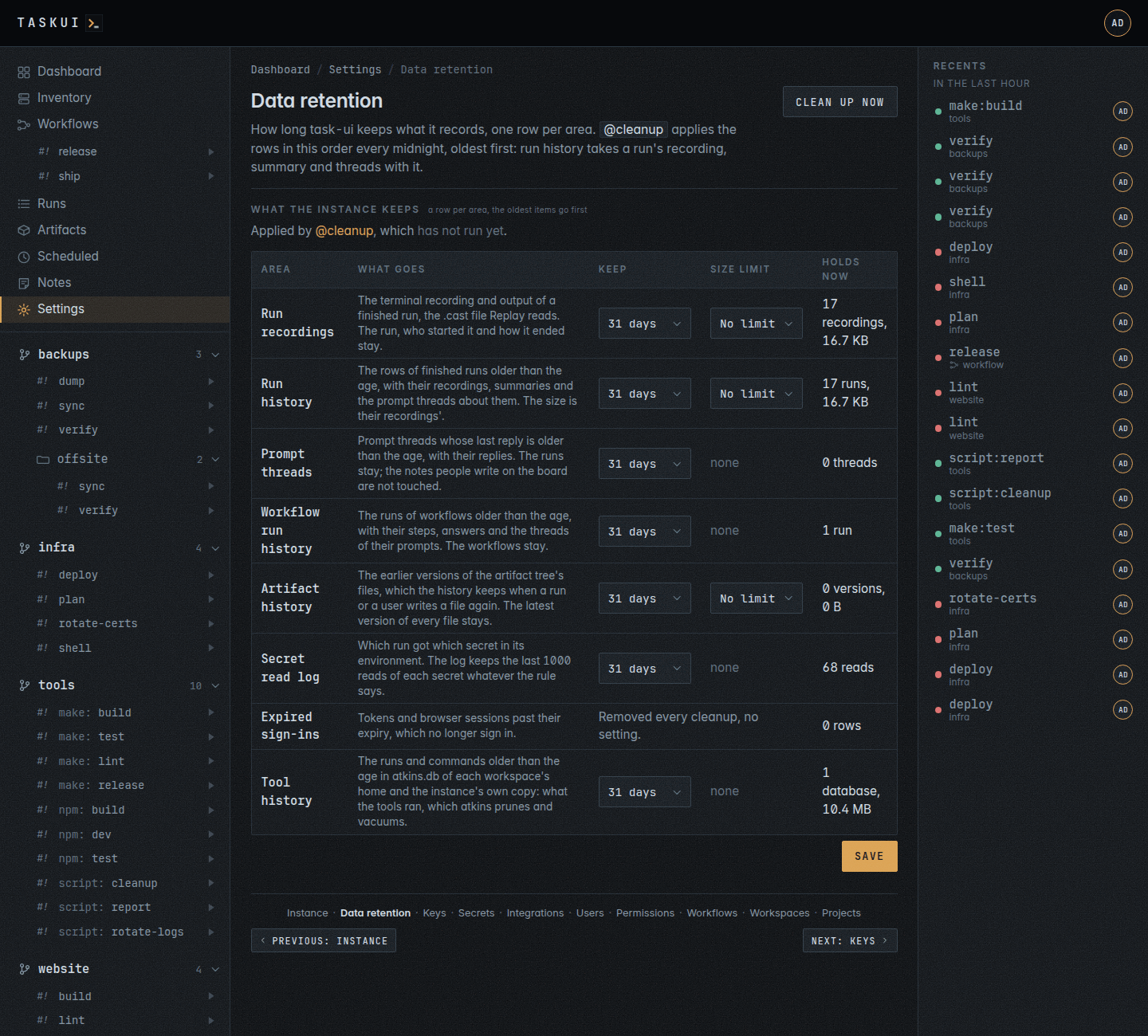
/settings/retention is one table of what the instance keeps, a row per area, with the columns Area, What goes, Keep, Size limit and Holds now. The line above the table names @cleanup, the job of the root folder that applies the rules, linking its runs, and says when it last ran and how it ended, linking the run. Every area the instance records has a row, and every area grows under a rule:
| Area | What goes | What stays | Rule |
|---|---|---|---|
| Run recordings | the .cast file of a finished run, its output |
the run, who started it and how it ended; its page says the recording expired | age and size |
| Run history | the rows of runs older than the age, with their recordings, summaries and the prompt threads about them | runs in progress or queued, and the cleanup’s own | age and size, the size their recordings’ |
| Prompt threads | prompt threads whose last reply is older than the age, with their replies | the runs; the board’s notes, which people write, at any age; a thread with an open or working instruction | age |
| Workflow run history | workflow runs older than the age, with their steps, answers and the threads of their prompts | the workflows; a workflow run in progress | age |
| Artifact history | earlier versions of the artifact tree’s files, with their records | the latest version of every file in the tree | age and size |
| Secret read log | which run got which secret | the last 1000 reads of each secret, which the log always keeps | age |
| Expired sign-ins | tokens and browser sessions past their expiry | the ones still signing in | fixed: removed every cleanup, no setting |
| Tool history | the runs and commands older than the age in atkins.db of each workspace’s home and the instance’s own copy, which atkins prunes and vacuums |
the newer runs and commands, the databases | age |
Every rule keeps 31 days at the start. Keep picks 24 hours, 7 days, 31 days, 90 days, 365 days or Never; Size limit, in the rows whose items have a size, picks one of these, and a limit saved through the API that is none of them shows as an option of its own. The closed select always shows the saved limit:
| Size limit |
|---|
| No limit |
| 100 MB |
| 500 MB |
| 1 GB |
| 5 GB |
| 10 GB |
| 50 GB |
The rows without a size show a dash there. Holds now is the count, with the bytes where the items have them. The fixed rows say their rule across the two columns.
Past either rule the oldest go first, until both hold. @cleanup applies the rows in the order of the table: run recordings, then run history, which takes a run’s recording, summary and threads with it, then prompt threads, workflow runs, artifact history and the secret read log, and the expired sign-ins last. A thread run history removes counts to run history. A recording of a run in progress, or of a step of a workflow run in progress, stays and counts towards the limit. A run of internal/*, from before prompts had folders of their own, falls under the same rules. A file deleted from the tree keeps its versions in the history until they expire.
Anyone who may open a step of the settings reads the page; an admin saves the rules, with PUT /api/retention, and Clean up now starts @cleanup at once, as a run whose output shows what went. A run of @cleanup works on the data directory it inherits, TASK_UI_DATA, with the workspace folder at <data>/workspaces: inside a run TASK_UI_WORKSPACE names the run’s workspace, and task-ui reads it as the folder outside a run alone. A save takes effect at the next run of @cleanup: task-ui schedules it @daily, at midnight, as the first admin, once, when it first starts; the Schedules page changes or deletes that schedule.
Telemetry
/settings/telemetry is the one form that configures what the instance
records of its own work. With it on, every sampled request becomes a
trace: the spans of the handler, the spans of the database calls under
it and, on a module page, the spans of the PHP that ran
inside the request, in the same trace. /debug/oida is where the traces
are read, and an admin alone may open it.
| Setting | What it does |
|---|---|
| Enabled | records traces. Off, a request passes through and costs nothing |
| Service name | the name on every trace and in the heading of the dashboard |
| Sample rate | the percentage of requests traced, 0 to 100 |
| Retained traces | how many finished traces the ring buffer holds; the oldest go first |
| Top requests | how many groups the rolling statistics keep |
| Spans per trace | the cap on one trace’s spans. The rest are counted, not kept. Zero is no cap |
| Refresh interval | how often the live view reloads, in seconds, where the browser cannot stream |
| Live stream | serves the live view over server sent events, so a trace appears as it happens |
| Capture logs | records the log lines a trace writes. Off, an error still lands on its span |
| Track memory use | records the process’s allocation change per trace |
| Trust Request-Id | reuses a client’s Request-Id header as the trace identifier. Behind a trusted proxy alone |
| Ignored paths | the paths never traced, one per line. An entry ending in /* matches by prefix |
| Allowed networks | the CIDR ranges that may open the dashboard, empty for every network |
Enabled takes effect on save and keeps the traces already recorded.
Every other setting rebuilds the recorder, which empties the ring
buffer: the page says so above the button. The settings live in the
setting table as telemetry.options, so they survive a restart, and
the OIDA_* variables of the environment set the first start of a fresh
instance.
Anyone who may open a step of the settings reads the page; an admin
saves it, with PUT /api/telemetry.
Keys
Keys have two purposes, and no key serves both:
- the encryption key stores secrets. The instance has exactly one, and it encrypts every secret, the workspaces’ and the integrations’ settings. Its row reads
encryptionafter the name. - SSH keys connect runs and git to hosts and remotes. A workspace has any number, for its own runs; the instance’s go to the runs of the roles and users they link. Git runs over ssh, and an SSH key’s purpose reads
git + sshin its menu, the git key’s too.
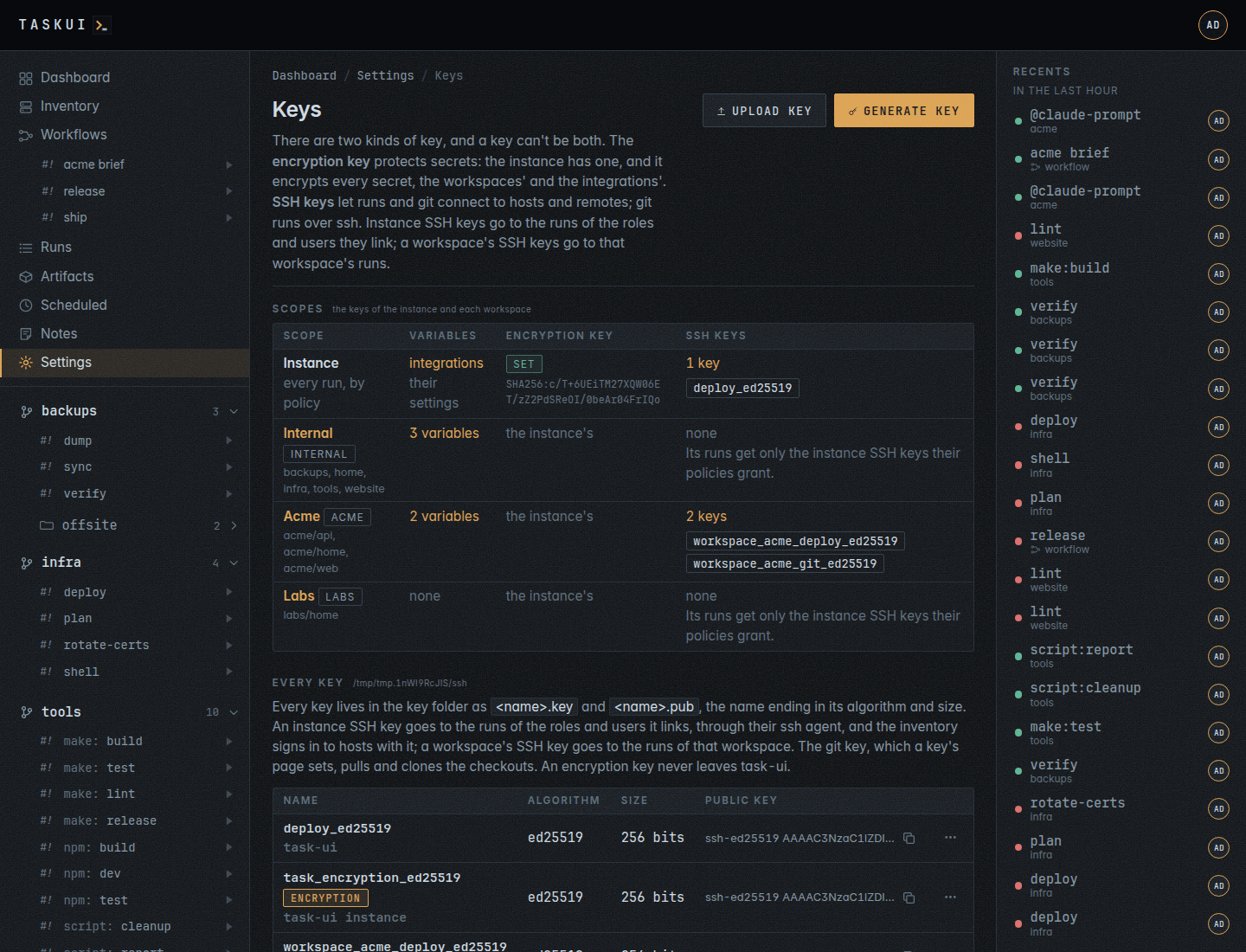
The page opens on one table, a row for the instance and one per workspace:
- Scope: the instance, or the workspace with its projects under its name. The name links to the workspace’s settings page.
- Secrets: how many the workspace stores, linked to
/settings/secrets?workspace=<name>. For the instance, the integrations. - Encryption key: for the instance, set, a link to the key’s row in Every key, whose ⋯ menu rotates it, and the key’s fingerprint in small type; for a workspace, the instance’s, which encrypts its variables too.
- SSH keys: how many, and their names, each linked to its edit form. A workspace with none says its runs get only the instance SSH keys linked to them, with Generate and Upload.
The only key task-ui makes on its own is the instance’s encryption key, at start when it’s missing. The workspace’s settings page has its SSH keys in its Keys section.
Every key lives in one folder, the key folder, TASK_UI_SSH_DIR, /keys in the image: flat, <name>.key and <name>.pub, the folder 0700 and each file 0600, beside known_hosts. The name ends with the algorithm and the size, deploy_rsa4096, task_encryption_ed25519, workspace_malta_build_ed25519, user_alice_ed25519, and is unique across the folder. The database says what each key is: the encryption key, or an SSH key of the instance or of a workspace, and whose runs get an SSH key. Only the key folder reads a key file: git, the inventory’s logins, the secrets and the runs all go through it, and none reads ~/.ssh.
Under the table, Every key lists them all in the columns every keys table has, the Instance page’s too: Name, as wide as the names, the encryption key marked encryption and a key’s comment under it, Algorithm (ed25519, ecdsa, rsa), Size (256 bits, 4096 bits), Public key, which takes the rest of the width, as much of the line as fits with the whole in its tooltip and a copy button that copies the whole line, and the row’s ⋯ menu. The menu opens on the key’s details, its fingerprint, its creation and rotation dates, its backup, scope, purpose, encryption or git + ssh, and links, then Copy public key, Download public key, Edit links, Rotate key or Delete backup, and Remove last. The table fits its box at any width; a narrow one leaves Algorithm and Size out.
- Generate key makes a key: a name, the algorithm and the size, ed25519 by default, ECDSA P-256, P-384 or P-521, RSA 2048, 3072 or 4096, and the purpose. Upload key takes a private key you already use, unencrypted, under a name; task-ui reads the algorithm and the size from it. A key the folder holds already, under any name or purpose, answers
409: a key has one purpose. - The copy button copies a public key, to add on the hosts that accept it. Remove, in the ⋯ menu, retires an SSH key: its files stay in the folder as
<name>.key.bak-<time>, nothing lists or loads them. - Who gets it picks whose runs get an instance SSH key, with the element Who gets it describes. A run started by someone with one of the key’s roles, or by one of its users, has it in the run’s ssh agent, and no other run does: that agent is the only way a key reaches a run, from memory, with no key file on disk. An instance SSH key with no link stays the instance’s: the inventory’s logins use it, runs don’t. A workspace’s SSH key has no such setting at all: it was added to one workspace and every run of that workspace gets it.
- git pulls and clones with this key, on a key’s edit form, makes it the one key git uses for every checkout; the Instance page shows it.
- A key for someone: Generate key in the Keys of her profile starts
user_alice_ed25519, linked to her. She finds it under SSH keys in her user menu, and copies the public half to her git host or servers. The key files are still readable by any job, as jobs run as the server’s user; links decide what a run gets, they do not hide a file. Keep the key folder out of~/.ssh, wheresshin a job would find the keys by default. - Who gets which key lists each role and each user, and the instance SSH keys their runs get: a user’s own keys, then, dashed, those of their role. The Runs as pickers of the schedule forms and the workflow editor name the same keys after each user.
- A project with private keys in its
.ssh/folder gets a warning: runs do not load them. Keys belong in the key folder: upload a key it needs and link it, then delete the folder.
The instance’s encryption key, task_encryption_ed25519, encrypts the integrations’ settings. No run, git remote or SSH connection gets it, and with it gone the workspaces’ secrets still open.
Rotate key
Rotate key, in the ⋯ menu of a key on the Instance page and in Every key here, makes a new key of the same algorithm and size under the key’s name and moves the previous one to backup/<name>.key and .pub in the key folder, 0600 in a 0700 folder. The key’s row records the backup’s fingerprint and when it rotated, and shows BACKUP ACTIVE: backup/<name> while the backup is there. Both keys serve meanwhile:
- the encryption key decrypts with the new key, then the backup, and the rotation writes the integrations’ settings again for the new key; the page says how many it re-encrypted.
- an SSH key goes into the ssh agent of runs, git pulls and host probes with its backup after it. A host or a remote that knows the old public key alone still lets them in. Add the new public key there, then delete the backup.
A key keeps one backup: while it has one, Rotate key stays off with “Delete the backup first”. Delete backup removes the backup’s files and record, after a confirm that names its fingerprint; the key then rotates again. The routes are POST /api/keys/{name}/rotate and DELETE /api/keys/{name}/backup; POST /api/keys/encrypt/rotate rotates the instance’s encryption key the same way, and a key with a backup answers 409.
One key, one use
A key either encrypts secrets or authenticates SSH connections, never both, and the folder holds a key once, by its fingerprint.
- No encryption key goes into a run’s ssh agent, into git’s ssh command, into a link, or to the inventory’s logins; no route hands one out.
- No SSH key is an age recipient or opens a secret.
- An upload of key material the folder holds already, under any name or purpose, answers
409and writes nothing. A scope holds one encryption key.
curl -s https://task.example.com/api/keys -H "Authorization: Bearer $TOKEN"
curl -s -X POST https://task.example.com/api/keys/generate -H "Authorization: Bearer $TOKEN" \
  -d '{"name": "deploy", "algo": "rsa", "bits": 4096, "policies": ["admin"], "users": ["claude"]}'
curl -s -X PUT https://task.example.com/api/keys/task_ssh_ed25519 -H "Authorization: Bearer $TOKEN" \
  -d '{"git": true}'
GET /api/keys lists every key, the instance’s encryption key again as encrypt and the git key’s name as git, public halves and fingerprints only. The rotation answers the key and rekeyed, the count of integration settings task-ui wrote again.
Moving the keys into the key folder
An instance from before the key folder kept its keys apart: TASK_UI_DATA/instance/encrypt, TASK_UI_DATA/workspaces/<id>/encrypt and ssh, and id_* files in TASK_UI_SSH_DIR. The first start takes them in once and logs each by its old file, its name and its fingerprint:
- the instance’s encryption key becomes
task_encryption_<algo>; - a workspace’s becomes
workspace_<folder>_encryption_<algo>, the default workspace’s folder asdefault, and its SSH keysworkspace_<folder>_<name>_<algo>, with their grants; id_ed25519of the key folder becomestask_ssh_ed25519, which git pulls with, andid_<type>_<name>, asid_rsa_deploy, becomes<name>_<algo>,deploy_rsa4096, with the roles and users its policy named.
Backups come along, to decrypt what they encrypted, and the secrets and the integrations open as before. The old files stay in place; nothing reads them, and the log says so: remove them once the keys work.
Secrets and env
Variables added to the environment of the runs. Every variable is either a secret, whose value the page never shows again once saved, or an env entry, whose value the page lists. task-ui encrypts both at rest and hands both to runs the same way, and task-ui get-secret reads either. The page lists them in one table: the name, the value (never a secret’s), what it applies to, its Reads, and the edit and delete actions; the ⋯ menu holds when it changed.
Every run records the variables it gets in its environment, one read per variable per run. Reads counts them and says how long ago the last run got the variable; that time links to the run, and its title names the job as folder/dir/job. The count links to the variable’s read log, /settings/secrets/<id>/reads: the runs that got it, newest first, 50 a page, each with when, the run, the job and who started it. task-ui keeps the last 1000 reads of each variable and drops older ones. The log is the only trace: task-ui writes nothing of a run’s environment into the run’s page, its output or its recording, neither values nor names. What a job prints itself, it records.
A variable applies to:
- All workspaces, scope
all, which reaches every folder in every workspace, including one added later. - one workspace,
workspace:<name>, which reaches its folders and projects and no folder of another workspace.
A folder’s own entry, malta/deploy, is an older scope: a run of that folder’s jobs reads the folder’s entry, and other runs in the workspace read the workspace’s. A run in a workspace reads the workspace’s entry; a run in a workspace without an entry of that name reads the one of every workspace.
Add variable at the top opens the form: a name, a value, a Secret box, and Applies to, every workspace or one. Unchecking Secret makes an env entry, whose value shows in the table; checking it keeps the value out of every page and response. Editing a secret leaves the value field empty: blank keeps the value it has. In the API, is_secret says which, and an env entry’s answer carries value. /settings/secrets?workspace=malta shows what reaches one workspace; the Workspaces page links each workspace’s count there. This page manages the variables of every workspace and project.
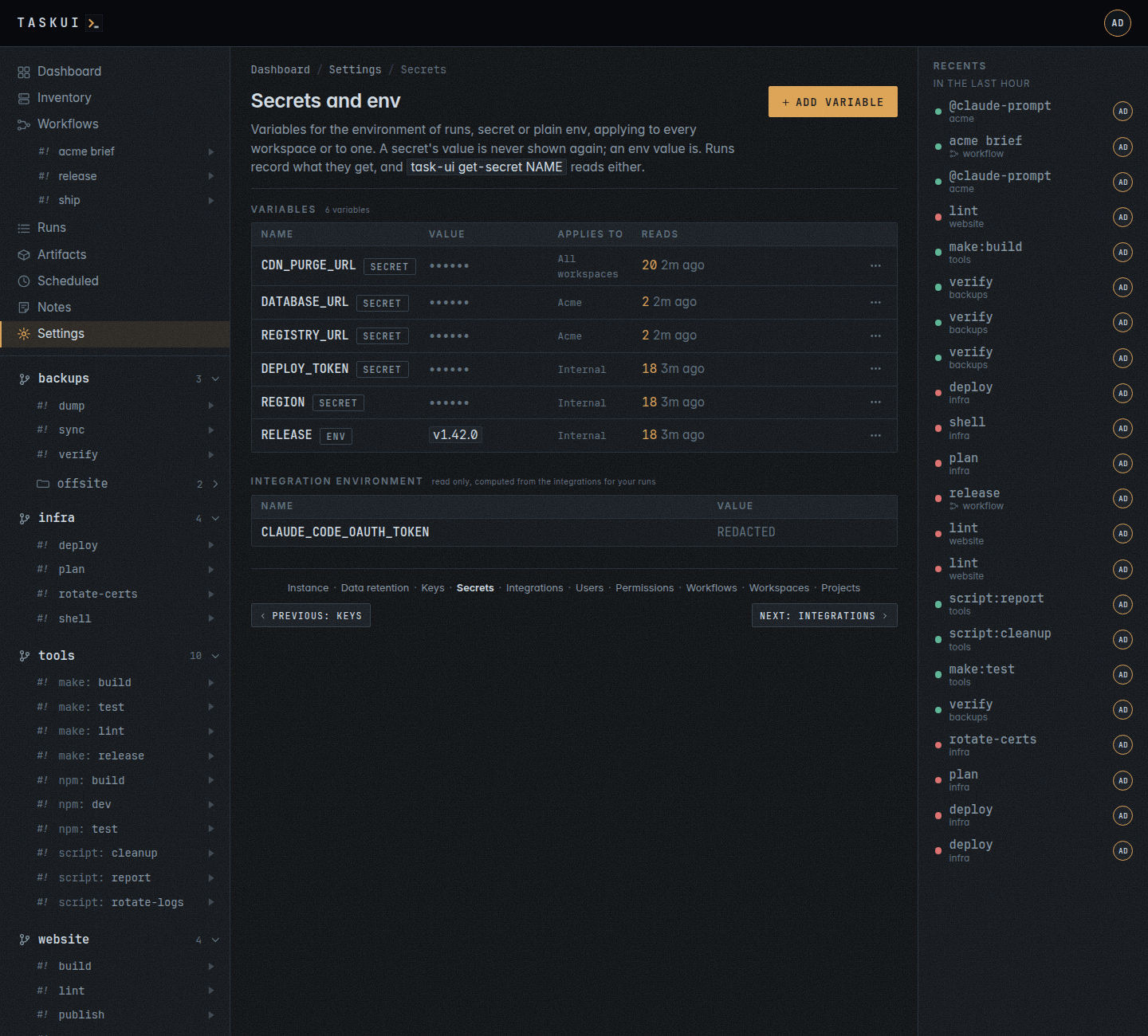
Below the table, Integration environment lists what the integrations compute for your runs, read only: the variable names and values, with the value of a name that holds a credential shown as REDACTED. The Integrations page sets those values.
The instance’s encryption key encrypts every variable, the workspaces’ and the integrations’: one encryption key per instance, which Rotate key rotates, re-encrypting them all. Runs see no change.
The scopes keep a workspace’s variables out of the environment of another workspace’s runs; on disk, those runs can still reach them (see What a workspace keeps apart). A folder’s workspace is its first segment when that’s a named workspace, else internal, while the instance has the default workspace. Removing a workspace waits for its variables to go first and takes its SSH keys. The integrations’ settings aren’t in the table: the Integrations page holds them, and the computed environment below shows their effect.
Secrets in scripts
A run gets its variables in its environment, secrets and env entries alike. A script reads one where it needs it with task-ui get-secret NAME, which prints the value and nothing after it, and fails with a message on stderr when no variable of the name reaches the folder:
GITHUB_TOKEN=$(task-ui get-secret GITHUB_TOKEN) gh release list
A value the server’s environment holds, which Parent environment None or Auto keeps from the runs, belongs in a variable of the workspace that uses it. For secretsmanager, which opens a project’s .secrets.json with SECRETSMANAGER_KEY, save the key as a secret of that workspace and set it for the one command that needs it:
SECRETSMANAGER_KEY=$(task-ui get-secret SECRETSMANAGER_KEY) secretsmanager ...
A Taskfile or an atkins step takes the same line:
# Taskfile.yml
tasks:
  release:
    cmds:
      - GITHUB_TOKEN=$(task-ui get-secret GITHUB_TOKEN) gh release create {{.TAG}}
# atkins.yml
jobs:
  decrypt:
    steps:
      - SECRETSMANAGER_KEY=$(task-ui get-secret SECRETSMANAGER_KEY) secretsmanager ...
task-ui get-secret reads TASK_UI_API, the instance’s API as the run reaches it, and TASK_UI_RUN_TOKEN, a token of the run’s own that signs in GET /api/run/secrets/{name} alone and stops working when the run ends. It returns the variables that reach the run’s folder, secrets and env entries, the set its environment holds, never a variable of the server’s environment, and each read lands in the variable’s read log under the run. Outside a run of task-ui it fails: neither variable is there.
At start, task-ui writes every variable the instance’s encryption key can’t open again for that key: a variable of a workspace’s encryption key from before one key encrypted them all, or of an instance that kept them all on its SSH key, the id_ed25519 or id_rsa of the key folder. A variable of scope all stays the one of every workspace. Before it writes anything it copies the database to task-ui.db.pre-instance-key, and for the integrations to task-ui.db.pre-keysplit; it reads each variable back before it keeps it. A variable no key opens stays untouched, and the log names it. The log lines secrets on the instance's encryption key and integrations on the instance's encryption key count what moved. Then each workspace’s encryption key whose variables the instance’s key opens goes, its row and its files in the key folder, logged as workspace encryption key removed; one with a variable the instance’s key doesn’t open stays, with a warning.
Integrations
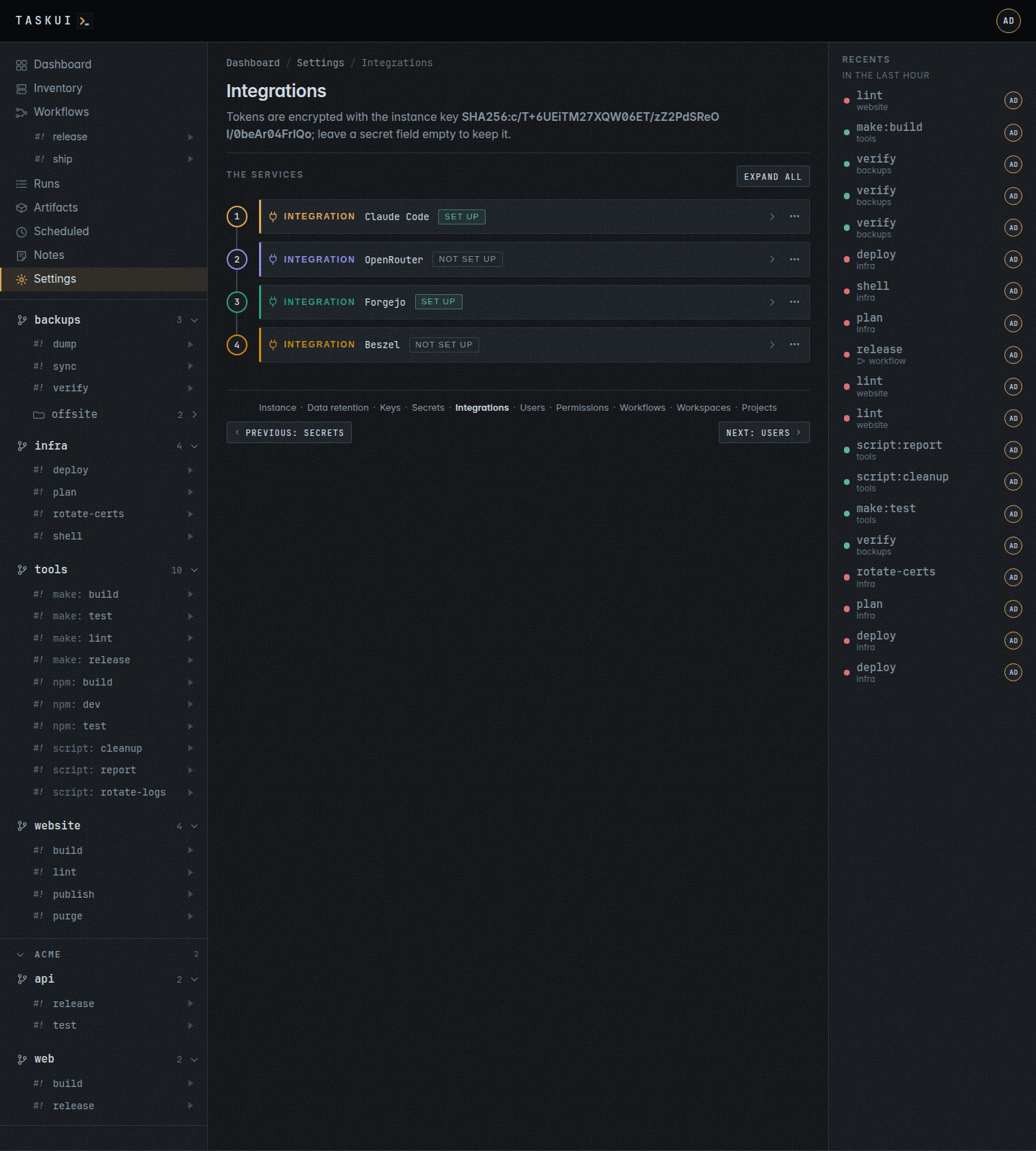
The services task-ui talks to, with their API keys and tokens, a card per integration on a numbered rail as the workflow editor’s steps: its name with its set up badge, its description and its form, and the numbered steps to its key folded under the form. Fold all folds the cards to their heads. task-ui encrypts the keys with the instance’s encryption key, as every secret, and never shows them again: a form marks a secret with a value as set, and an empty secret field keeps it on save. The Secrets page leaves them out, and no run sees them as secrets. Clear, in the ⋯ menu beside the name, deletes every setting of an integration. The API serves the steps with the kind, steps on GET /api/integrations.
- Claude Code: the token Claude Code signs in with, from
claude setup-token, for the whole instance, and Who, the element Who gets it describes: a box for each role and each user, checked for those whose runs get it asCLAUDE_CODE_OAUTH_TOKEN, such as the admin role and the userclaude. Check the agent’s user too: the agent job of the Notes board runs as that user. With no box checked, every run gets it. The token alone sets the integration up. With OpenRouter set up, its auth token stands in for this one. - OpenRouter: a key that sends Claude Code to OpenRouter’s gateway; the key sets every variable, see OpenRouter below.
- Forgejo: the git host’s URL and a token, for the sync that makes workspaces of its organisations and users and projects of their repositories, see Forgejo below.
- Beszel: the hub’s URL, as task-ui reaches it, and a token, for the Inventory page. task-ui reads the collections
systems,system_stats, the latest minute of each host and its records of eight or two hours for the charts,containers, the containers each host runs, andcontainer_stats, their records, the newest minute on a hub withoutcontainers. A read-only user reads them all.
OpenRouter
The OpenRouter integration points every Claude run at https://openrouter.ai/api with a key from that account: the agent jobs, the prompts, the workflow’s prompt and summary steps, and the summaries task-ui requests. A key needs credit on the account, and a model OpenRouter serves.
The key reaches a run twice, as OPENROUTER_API_KEY for the tools that read it and as ANTHROPIC_AUTH_TOKEN for Claude Code. A run gets ANTHROPIC_API_KEY empty, overriding a value the server’s environment carries, and while it gets the auth token it gets no CLAUDE_CODE_OAUTH_TOKEN. The two sign-ins never compete. A set key sends every variable below; there is no per-variable switch, and an empty value takes its default.
| Setting | Variable | Value |
|---|---|---|
| API key | OPENROUTER_API_KEY, ANTHROPIC_AUTH_TOKEN |
the key |
ANTHROPIC_API_KEY |
ANTHROPIC_API_KEY |
empty |
| Base URL | ANTHROPIC_BASE_URL |
https://openrouter.ai/api |
| Model | ANTHROPIC_MODEL |
deepseek/deepseek-v4.1-flash-1017 |
| Fable model | ANTHROPIC_DEFAULT_FABLE_MODEL |
deepseek/deepseek-v4.1-flash-1017 |
| Opus model | ANTHROPIC_DEFAULT_OPUS_MODEL |
deepseek/deepseek-v4.1-flash-1017 |
| Sonnet model | ANTHROPIC_DEFAULT_SONNET_MODEL |
deepseek/deepseek-v4.1-flash-1017 |
| Haiku model | ANTHROPIC_DEFAULT_HAIKU_MODEL |
deepseek/deepseek-v4.1-flash-1017 |
| Subagent model | CLAUDE_CODE_SUBAGENT_MODEL |
deepseek/deepseek-v4.1-flash-1017 |
| Context tokens | CLAUDE_CODE_MAX_CONTEXT_TOKENS |
1000000 |
| Compact window | CLAUDE_CODE_AUTO_COMPACT_WINDOW |
400000 |
| Gateway model discovery | CLAUDE_CODE_ENABLE_GATEWAY_MODEL_DISCOVERY |
1 |
| Unknown model window | CLAUDE_CODE_DISABLE_UNKNOWN_MODEL_WINDOW_ENFORCEMENT |
1 |
| Nonessential traffic | CLAUDE_CODE_DISABLE_NONESSENTIAL_TRAFFIC |
1 |
| Todo tools | CLAUDE_CODE_ENABLE_TODO_TOOLS |
1 |
The base URL, the models and the numbers are fields in the table; a model other than the default is a change of that row.
Who gets it
One element picks whose runs get something, wherever a form asks: whose runs get an SSH key, who may run a project or one of its jobs, and whose runs get the Claude token. It lists the roles, each with how many users act with it, and the users, each with the role a run checks for them: an admin-flagged user with the runner role counts as admin. Beside each user stands their state, which follows the boxes as you check them, before the save:
- gets it: the user’s own box has a check.
- gets it as
role: the user’s box is clear, and a checked role is the role they act with; the row carries the same tint as a checked one. - doesn’t: neither, and a run of the user starts without it; the row is faint.
- gets it (everyone): no box at all has a check, roles or users, and nothing checked means everyone: every run gets the token, everyone who may run can.
The line under the list sums it up: None checked: every run gets the token, in the words of the form, or how many of the users get it, naming the ones who don’t when they are five or fewer. An instance SSH key with none checked goes to no run. There every user reads doesn’t and the line says so. A name the setting holds that is no user of the instance keeps a checked box, marked no such user, and a save keeps it. In the per-job table of a project’s settings the element runs on one line without the line under it.
Beszel’s token
Beszel has no API keys. task-ui takes a token of a read-only user that no one signs in as. Make one in Beszel with a password nobody keeps, then mint a token for it as a superuser, with how long it lasts in seconds:
super=$(curl -s -X POST http://beszel:8090/api/collections/_superusers/auth-with-password \
  -H 'Content-Type: application/json' -d '{"identity":"<admin email>","password":"<admin password>"}' | jq -r .token)
curl -s -X POST http://beszel:8090/api/collections/users/impersonate/<user id> \
  -H "Authorization: $super" -H 'Content-Type: application/json' -d '{"duration":31536000}' | jq -r .token
The token works until it expires, and changing the user’s password in Beszel revokes it.
Forgejo
The Forgejo integration mirrors a git host into task-ui: every organisation the token’s user belongs to is a workspace, and so is every user whose repositories the token reads, by the same rules. The owner’s lower case name is the workspace’s folder; the repository named like the owner, malta/malta for the organisation Malta and black/black for the user black, is the workspace’s home repository, the convention a home follows (see Workspaces); every other repository of the owner is a project in the workspace’s src, cloned on its default branch. A user’s repositories are the ones the token reads, the token user’s own private ones among them; a user with none gets no workspace, with the line skipped <login>: no repositories in the report. An instance with many accounts grows no empty workspaces. An organisation gets its workspace even without a repository.
The settings:
- URL: the instance, such as
https://git.cdn.si. - Token: a personal access token of a user who is a member of the organisations to sync. Mint it in Forgejo under Settings -> Applications -> Generate token, with the scopes
read:user,read:organization,read:repositoryandwrite:repository; the first lists the users, the last is for the hooks alone, which sync installs on the repositories. Withoutread:userthe sync does the organisations and saysusers skipped: the token lacks read:user. - Clone over:
ssh, the default, clones with the instance’s git key as every project does (see Keys);httpsworks for public repositories, as task-ui puts no token in a clone URL. - Webhook secret: what signs the pushes Forgejo posts. Leave it empty and the first save makes one, which later saves keep.
Sync now runs @forgejo-sync of the root, task-ui forgejo-sync, and opens the run window on it; Dry run runs it with --dry-run, which reports what a sync would do and changes nothing. The run’s output is the report, in the shape of a terraform plan: a block per owner, the organisations first, then the users, and a footer with the counts.
# org Malta
  + workspace malta: would create
  + home Malta/malta: would clone main
  + project malta/apps: would clone main
    skipped Malta/old-thing: archived
  + hook Malta/apps: would install
# org Acme
    workspace acme: ok
  ~ project acme/web: would update url
  ~ hook Acme/web: would update
# user black
  + workspace black: would create
  + home black/black: would clone main
  + project black/dotfiles: would clone main
    skipped hook black/dotfiles: the token has no admin access
! orphan acme/vhosts: not on Forgejo, left alone

Plan: 2 workspaces to create, 2 homes to clone, 2 projects to clone, 1 hooks to install, 2 to update, 1 unchanged, 2 skipped, 1 left alone, over 2 organisations and 1 users.
A symbol leads each row: + for what sync creates, a workspace, a home or project clone, a hook, ~ for what it brings current, a pulled home, a project’s URL or a hook, and ! for what it leaves alone where Forgejo says otherwise, an orphan whose repository Forgejo lacks, a home that is another repository’s checkout, a directory in src that is no checkout, and for what fails. A row sync finds in place, ok or exists, and a skipped row with its reason carry no symbol. The footer, Plan: for a dry run and Applied: for a sync, counts them by kind. In a run and on a terminal the report has colour: + green, ~ yellow, ! red, the unchanged and skipped rows dim, an organisation and a workspace name cyan, a user login magenta, a project blue; --no-color as an argument, or NO_COLOR in the environment, turns it off, as a pipe does. The line under the form names the last run and links to it. Admins run the job, by hand, on a schedule or as a workflow step, as @cleanup runs.
Sync adds and updates, and never removes:
- A missing workspace comes into being with its
homeandsrc; one that exists stays as you set it. - The home: sync clones the repository into an empty home directory, pulls a home that is the home repository’s checkout, and leaves a home that is a checkout of some other repository alone, with a line in the report: replace it on the workspace’s settings page if the convention should apply. Without a
<org>/<org>or<login>/<login>repository the home stays, empty or not. - A project row that exists keeps its title, who may run it and its other settings; its source URL follows the repository’s. A checkout without a row gets one; a directory in
srcthat is no checkout stays alone. - Sync skips an archived repository, and one whose name task-ui keeps,
home,src,internalorinternal; a mirror or a fork is a project like any other. - A project whose repository Forgejo lacks shows as
not on Forgejoand stays; remove it on the Projects page if it should go.
For every repository it syncs, sync lists the repository’s webhooks and, when none posts to the instance’s <URL>/api/webhooks/forgejo, installs one: a push hook, JSON, signed with the webhook secret. A hook takes admin access to the repository, which the token has on its user’s own repositories and on those of an organisation the user owns; on any other, the report says hook <owner>/<repo>: skipped, the token has no admin access, counted among the skipped, and the checkout stays as a project without a hook. On a push, Forgejo posts to the instance, task-ui checks the signature and pulls the checkouts of that repository, the project and the home alike, under the lock a run pulls with. A pull waits for a job in progress. An instance without a public URL (TASK_UI_URL) installs no hook, and the report says so. Sync turns a hook of ours that is off or hears other events back into a push hook; the listing shows no secret. A changed webhook secret reaches the hooks only when you delete them on Forgejo and sync again.
Troubleshooting: a hook whose delivery Forgejo shows as 401 has a secret other than the integration’s: delete the hook in the repository’s settings and run Sync now. A 404 means the integration is not set up on the instance the hook reaches. A 200 with no such checkout means no project or home has that repository’s clone URL: sync, or check the project’s source URL. A sync that ends with listing the organisations: forgejo answered 401 has a token Forgejo does not take any more. users skipped: the token lacks read:user is a token without that scope: the organisations sync, the users wait for a token with it.
Users
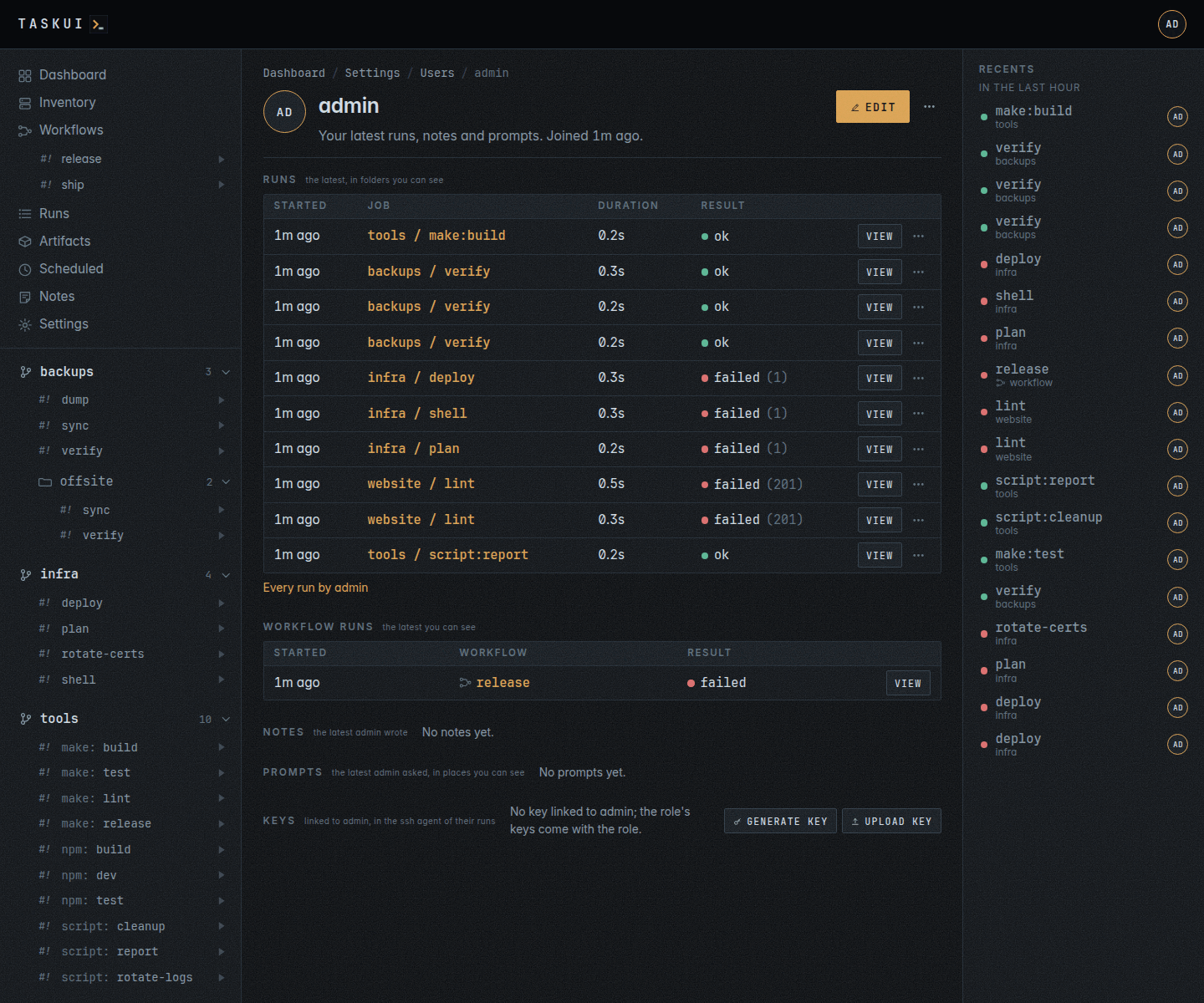
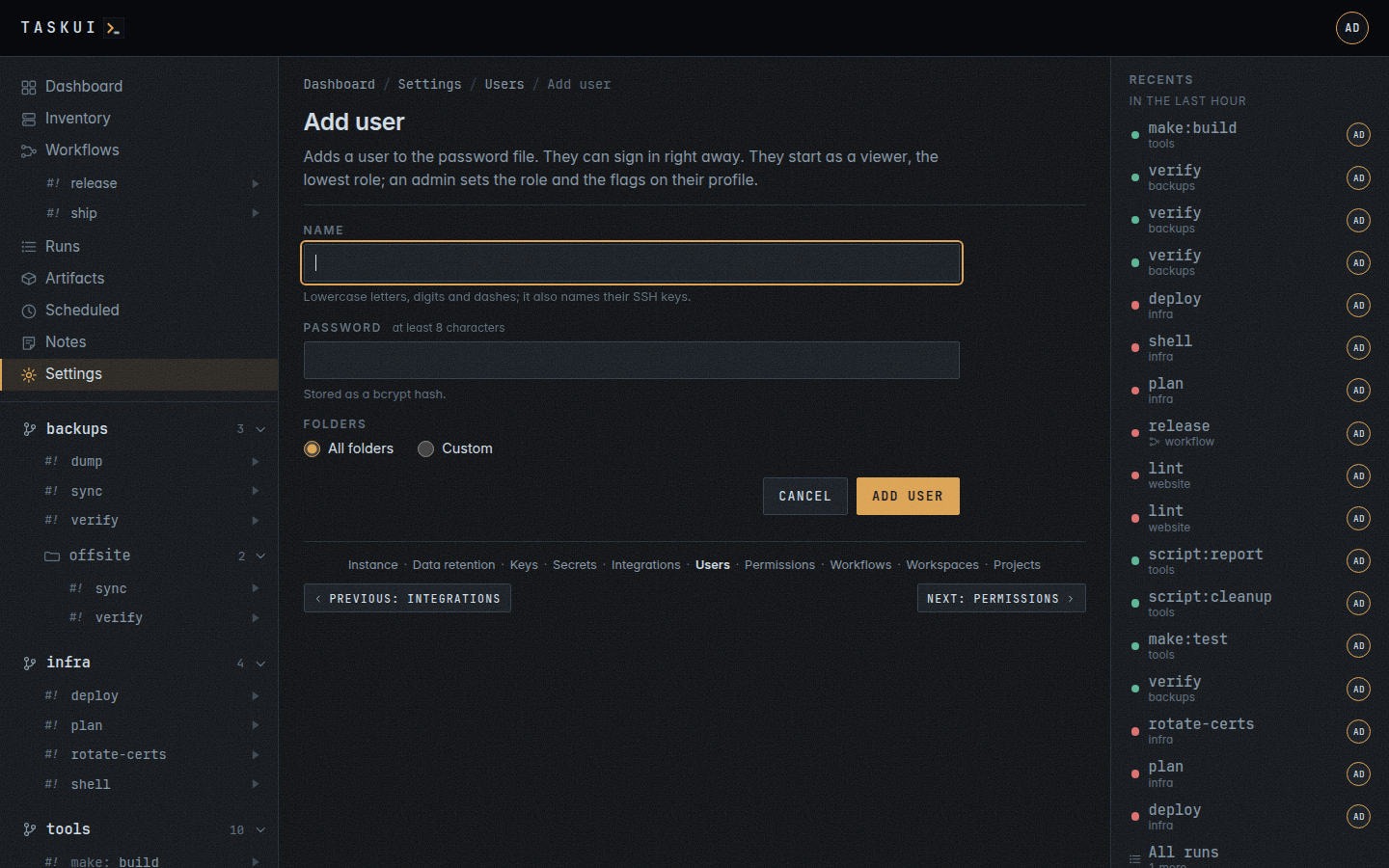
Who may sign in comes from the password file on the server. Create user adds one to it, with a name and a password of at least 8 characters, and they can sign in at once; task-ui passwd <user> on the server adds or resets one too. Delete, in a user’s row’s ⋯ menu or on the profile, removes one who is no admin and not you: their line leaves the file, and their sessions, tokens and policy end at once, while runs, notes and history keep their name. Deleting takes Allow Deletes on Users, user/delete. Removing the line on the server does the same, and task-ui reads the file again whenever it changes. A new user comes in as a viewer, the lowest role; the first users of an empty database come in as admins (see Running the server). The Flags column shows mcp for an MCP agent user and agent for one whose mentions run instance Claude.
What a role may do comes from permission policies on the rules of config/permissions.yml, which Permissions sets. An admin may do everything. A runner runs jobs, reads and writes notes, workflows, schedules and the artifact tree, and reads the inventory; a viewer does the same without running and without writing the artifact tree. A user’s own allow or deny decides for that user; where the user has none, the role’s rules decide, and a deny there denies the action even where another rule allows it. Permissions lists what each role starts with.
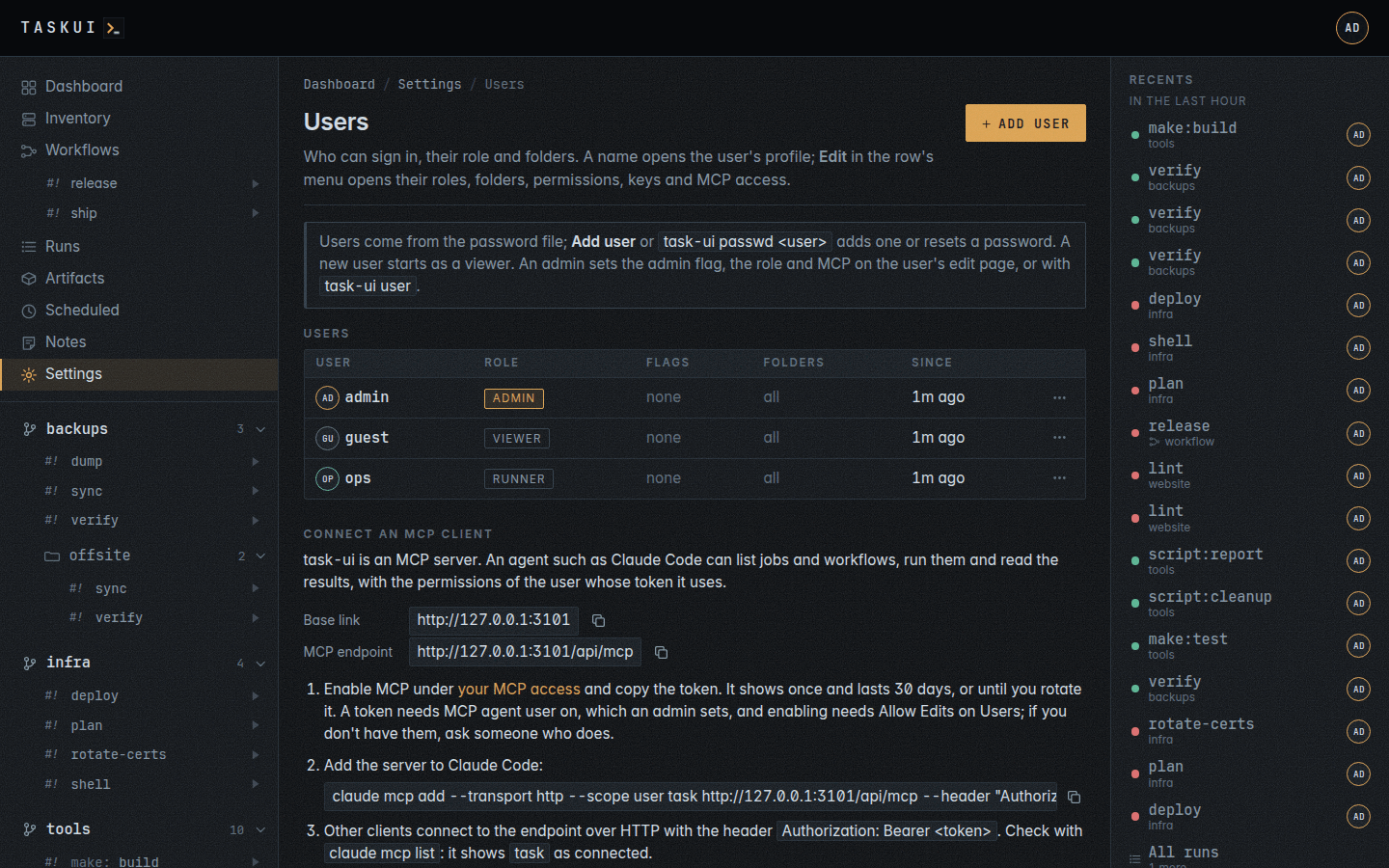
A user’s name opens their profile, at /users/<name>: the name, when they joined, and what the user did lately, as far as you see it, in the order you look at a person: Runs in folders you see, each with its result and View or Attach, Workflow runs, Notes with Allow View on Notes, each as one line of plain text, and Prompts with Allow View on Prompts in places you see. A section with nothing says so in one line. Anyone with Allow View on Users opens any profile; everyone opens their own, from Profile in the user menu. The profile shows no roles, permissions or forms; Edit, top right, for your own page or with Allow Edits on Users, opens them, and the ⋯ menu holds Runs by this user and Delete.
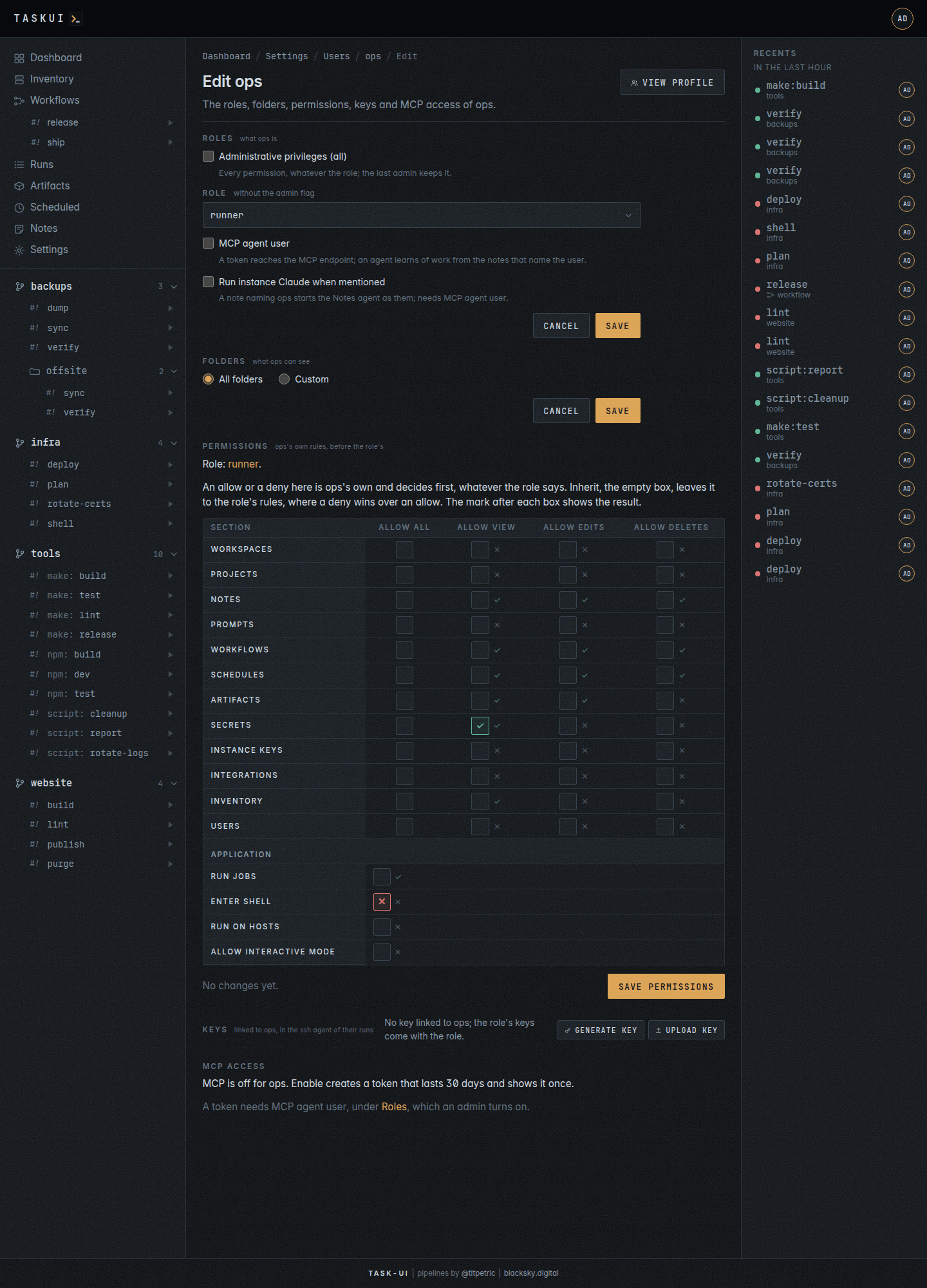
The edit page, at /users/<name>/edit, from Edit on the profile or in a user’s row’s ⋯ menu, holds what the user is and may do, with View profile top right and Cancel under a form back to the profile. It opens as the profile does; each form saves through the API, which takes Allow Edits on Users, and shows its values as text to anyone else. Its sections, in order:
- Roles, which an admin sets:
- Administrative privileges (all): every permission, for any role. The last admin keeps it: unchecking it answers “the last admin”.
- Role: runner or viewer, what the user’s permissions start from without the flag.
- MCP agent user: the user’s token reaches the MCP endpoint, and an agent learns of work from the notes that name the user. Off, it ends the user’s MCP token.
- Run instance Claude when mentioned: a note naming the user starts the Notes agent as them. It needs MCP agent user.
- Folders: which folders the user sees, All folders, or Custom and the folders checked.
- Permissions: the user’s own rules, on top of the role’s (see Permissions).
- Keys: the SSH keys linked to the user, with Generate key (see Keys).
- MCP access: Enable MCP makes a token for an MCP client that lasts 30 days and shows it once, with the
claude mcp addcommand filled in. Once on, the section shows its dates, the expiry in amber within a week and red once past, with Rotate and Disable. Enabling takes Allow Edits on Users; you rotate or disable your own from your own edit page. See MCP.
/settings/users/<id> opens the edit page too.
Next to a user’s name, on every page that shows one, a ⋯ button opens a menu: Profile, Runs by this user, which opens Runs filtered to them, and Edit with Allow Edits on Users. A name that no user holds, such as the agent a note names, has no profile.
A client that is not a browser, such as an agent over MCP, signs in with a token instead: task-ui token <user> <name> on the server prints one, once, without an expiry. Under the table, Connect an MCP client shows the instance’s base link and its MCP endpoint, each with a copy button, the link to your own MCP access, and the command that connects Claude Code.
Permissions
What each role may do, rule by rule, over config/permissions.yml: each section, such as Notes, Secrets or Users, has the rules Allow All, Allow View, Allow Edits and Allow Deletes, and the application has Run Jobs, Enter Shell, Run on Hosts and Allow interactive mode. A matrix per role holds a row per section, a column per rule, and under them the application’s permissions. No rule reads a private key: none leaves task-ui.
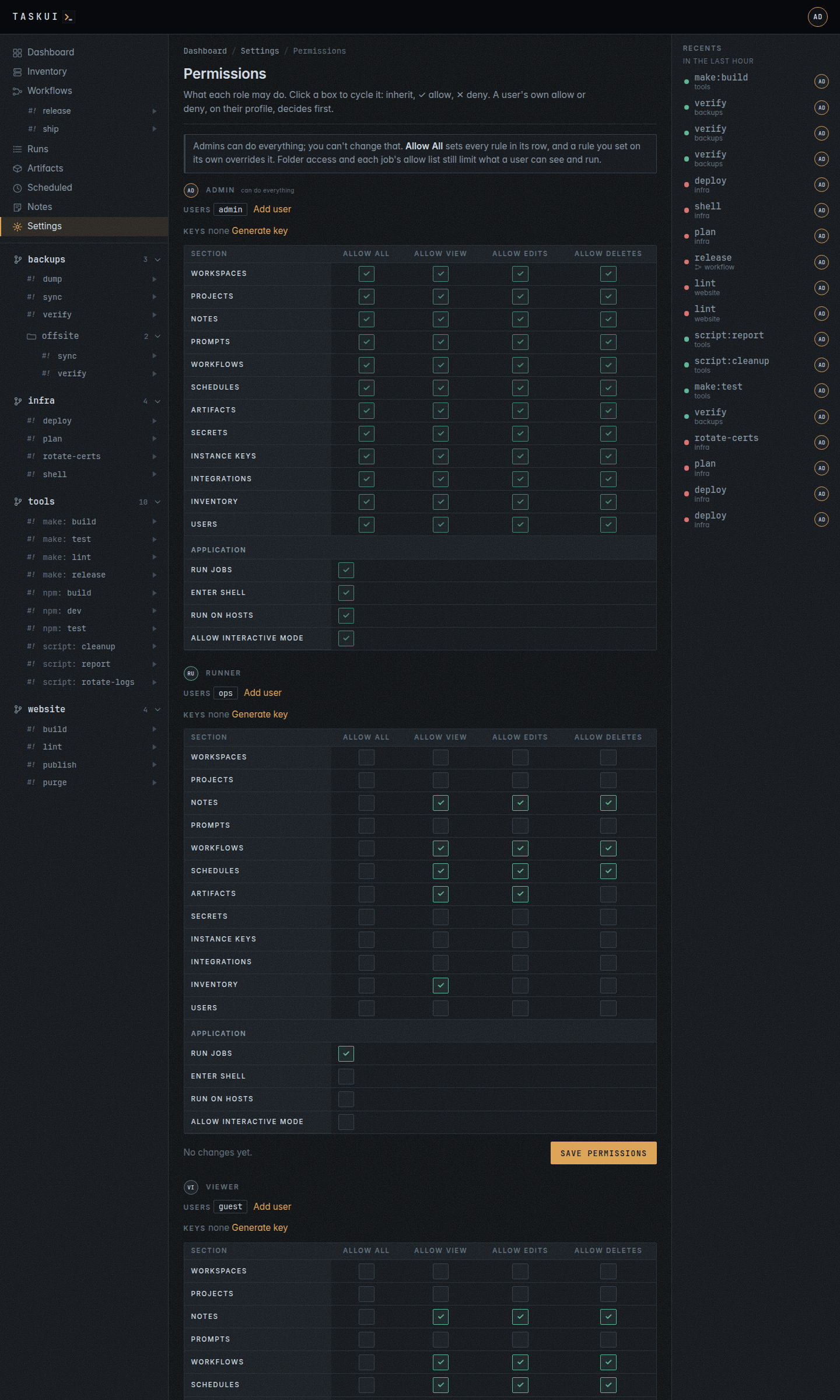
A cell inherits, empty, allows, a green ✓, or denies, a red ✕; a click moves it to the next, and Save permissions keeps the cells that changed. Allow All sets every rule of its section; where it and a rule set on its own disagree, task-ui applies the deny. The admin role shows every cell allowed and none changes: an admin may do everything. The page opens with Allow View on Users and changes with Allow Edits on Users; your own role’s matrix changes only when your role grants Allow Edits on Users.
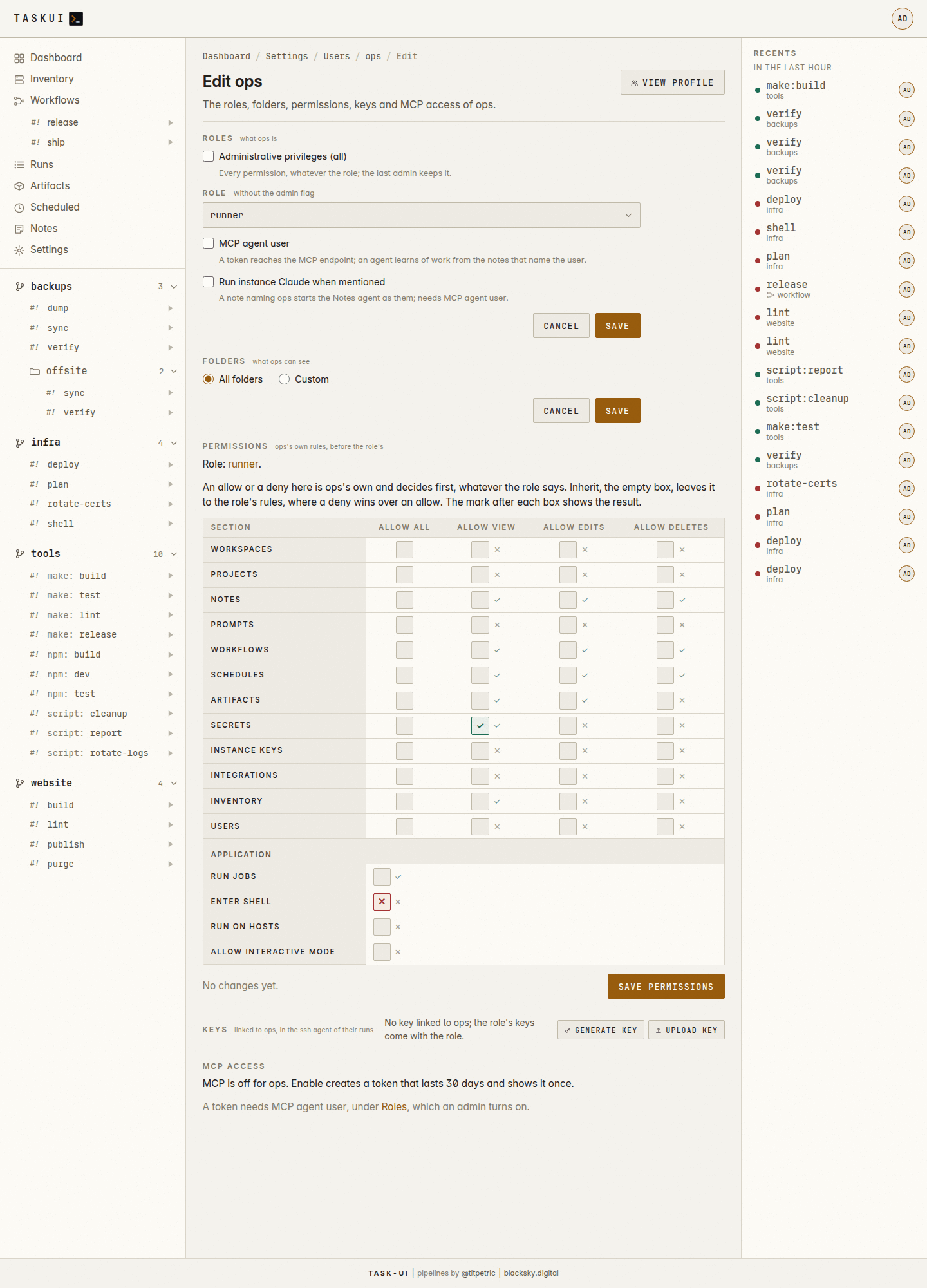
A user’s edit page has the same matrix under Permissions, for their own policy on top of their role’s, with the result after each cell: a muted ✓ where the user may do it, ✕ where not. The user’s own allow or deny decides for that user; an empty cell inherits the role’s rules, where a deny denies the action even where another rule allows it; what neither allows, the user may not do. An admin’s matrix shows everything allowed and does not change, and your own changes only with Allow Edits on Users through your role. No one grants themselves more.
The application’s permissions gate what the sections do not:
| Permission | Rule | Gates |
|---|---|---|
| Run Jobs | run |
starting a folder’s jobs and ending their runs, from the pages, the API and run_job; a workflow takes it for every step, and a schedule for its job |
| Enter Shell | shell |
Enter Shell, the job @shell, an interactive bash -l, and Enter Claude, the job @claude, which also takes a Claude token; task-ui checks it besides their allow list, which names the admin role and no folder rule widens: admins alone start them |
| Run on Hosts | hosts |
the command form of Inventory, which runs a command on its hosts over ssh, and its Run and summarize |
| Allow interactive mode | input |
Take input in the run window: typing into a running run of a job that takes no input, to answer a prompt it waits on (see Runs) |
The admin role may do everything and holds no policy. The other roles, and the claude user, start with these policies; everything else they lack until a policy allows it:
| Subject | Allowed at the start |
|---|---|
| runner role | Run Jobs; view, edit and delete on Notes, Workflows and Schedules; Allow View and Allow Edits on Artifacts; Allow View on Inventory |
| viewer role | the runner’s, without Run Jobs and Allow Edits on Artifacts |
claude user |
Run Jobs; Allow View and Allow Edits on Notes and on Prompts |
So no role but admin starts with Enter Shell, Run on Hosts, Allow interactive mode, the prompts or any section of the settings.
Folder visibility and the allow lists of jobs apply on top of the permissions: a user runs a job with Run Jobs, in a folder they see, when its allow lists name them or their role.
Workflows
The workflows step opens the Workflows page, the chains of jobs that run one after another. Its footer links to Permissions before it and Workspaces after it.
Workspaces
Directories under the root, each with a home, the checkout of an organisation’s tooling or an empty directory, which the workspace’s runs get as HOME, and a src of projects side by side. Add workspace makes one under the folder you name, its home cloned from a Home repository when the form has one, Move up and Move down order them, and Delete deletes one with everything inside it. Edit workspace opens a workspace’s settings page: its title, description, Recursive, the toggle a project has, and Hours, when its runs may start (see Workspaces), its Home repository, with Pull now, Replace or Clone, and Remove, its Projects, in the table of the Projects page, and its Keys, the SSH keys of its runs, which the Keys page also lists. /settings/workspaces/<folder>/keys, SSH keys in the ⋯ menu of the workspace’s page, edits its keys in place, and Secrets opens the secrets page filtered to what reaches it. At the top right of that page, Add project clones a project into the workspace, and, for an admin, Export downloads the workspace, encrypted to a passphrase, which Import at the top right of the Workspaces page reads on another instance, for an admin there. Workspaces covers them, their keys and runs, the move between instances, what they keep apart, and the prompt against a workspace.
Projects
The projects of each workspace, a block per workspace: the projects at the top of the root first, then each workspace’s projects, with their sources, where they came from, and the space each takes: its files, and the git history beside them. A workspace’s block has its own Add project, which clones into it; the Origin column holds a long remote on one line, whole on a hover.
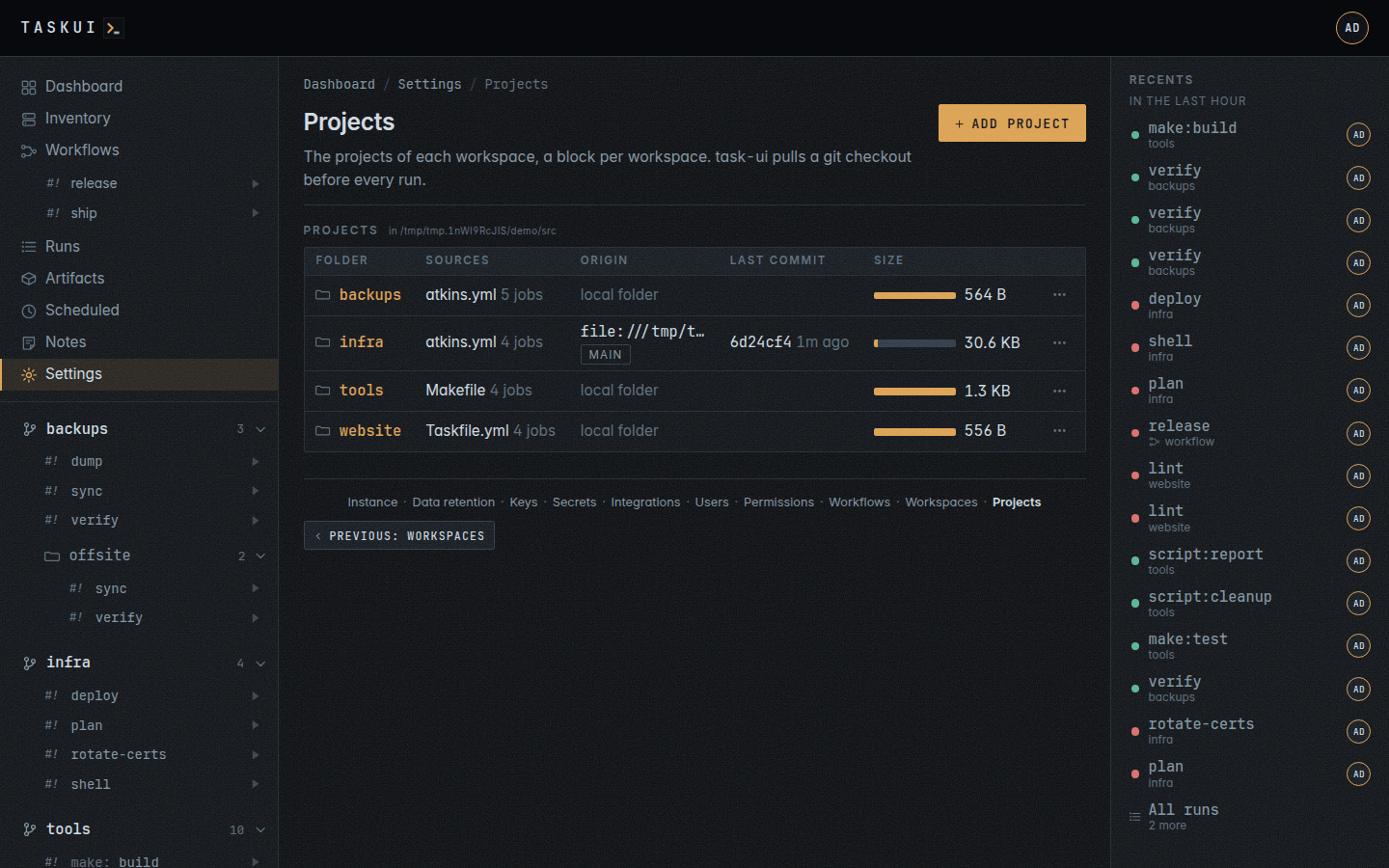
Add project clones a git repository into the root. It either works, and the folder appears in the sidebar, or the page shows git’s output and keeps nothing. git reaches private repositories with the instance SSH keys.
A row’s [...] menu opens the folder, its Edit project, and Pull now, which runs @git:pull there, on a checkout with the git skill for a user who may run the folder’s jobs. Remove checkout, last in the menu, in this list, on the settings page and on the folder’s page, deletes the folder, its files and its configuration, for a user with Allow Deletes on Projects, project/delete. It names the folder and the remote to clone it again from before it does.
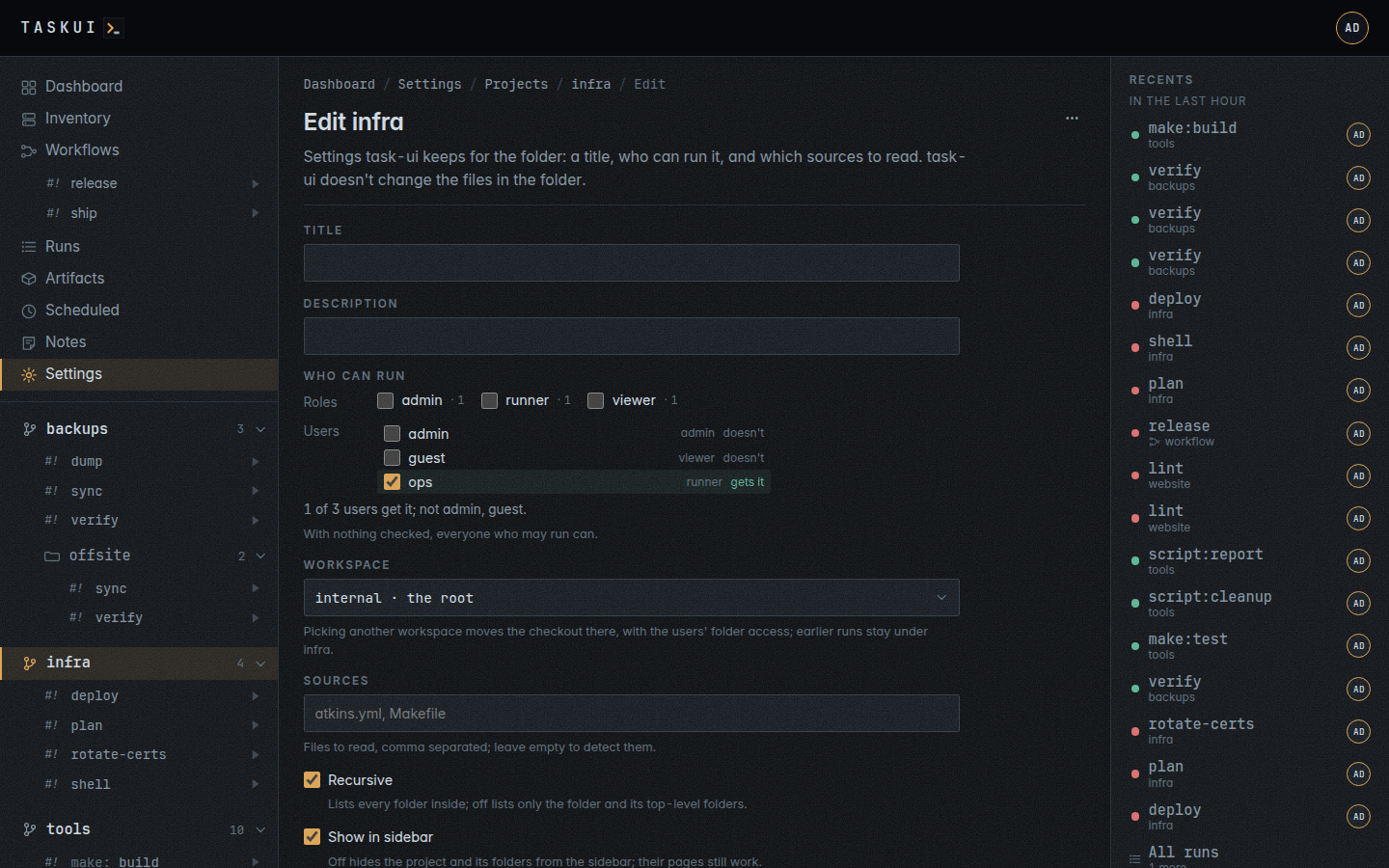
Edit project on a folder sets what the instance adds to it; its files stay as they are:
- a title and a description;
- who can run it: the roles and the users, with the element Who gets it describes; none checked is everyone who may run. Each job has the same element in the per-job table, which decides for that job, and none checked there inherits the folder’s;
- which sources to read, which is also how a folder with a pipeline gets its Makefile or scripts back as jobs;
- Recursive, on by default, lists the folders inside the project as deep as they go; off lists the project and its top-level folders alone, to keep a tree’s nested folders out of the catalogue (see Projects and jobs);
- the workspace a project at the top of one is in: another one moves the project there, as Move a project describes.
The API sets two more on a project: commands, the program a kind of job runs with (make: gmake), and job_allow, who may run, per job. A project has no hours: its workspace’s apply.
Sidebar
/settings/sidebar is the sidebar itself, as a table: a row per item,
in the order the sidebar lists them, with the columns Order,
Item, Link and Shown. Every item of the sidebar’s top block
has a row, Dashboard through Settings, and so does every
module the instance found.
Drag a row by its grip to move it, or focus the grip and press the up
and down arrows; Move up and Move down in the row’s ⋯ menu
do the same with the keyboard alone. The Shown switch leaves an item
out of the sidebar without deleting it. Nothing is saved until Save
at the bottom of the table, which writes the whole table at once with
PUT /api/sidebar, so a change that goes wrong is one reload away from
the state before it.
An item the sidebar hides is still reachable by its link, and the
permission of the page behind it still decides: hiding Settings takes
the row out of the sidebar and leaves /settings open to whoever may
read it. A row names the rule of its page, and a user without that
rule never sees the row at all.
A module that registers gets a row at the end, shown. A module that is gone loses its row, and the order of the rest stays.
The order lives in the sidebar table as a position per row, written
from the order of the rows the form posts. An instance with no rows
seeds them from the fixed list the sidebar had before the table existed.