Notes
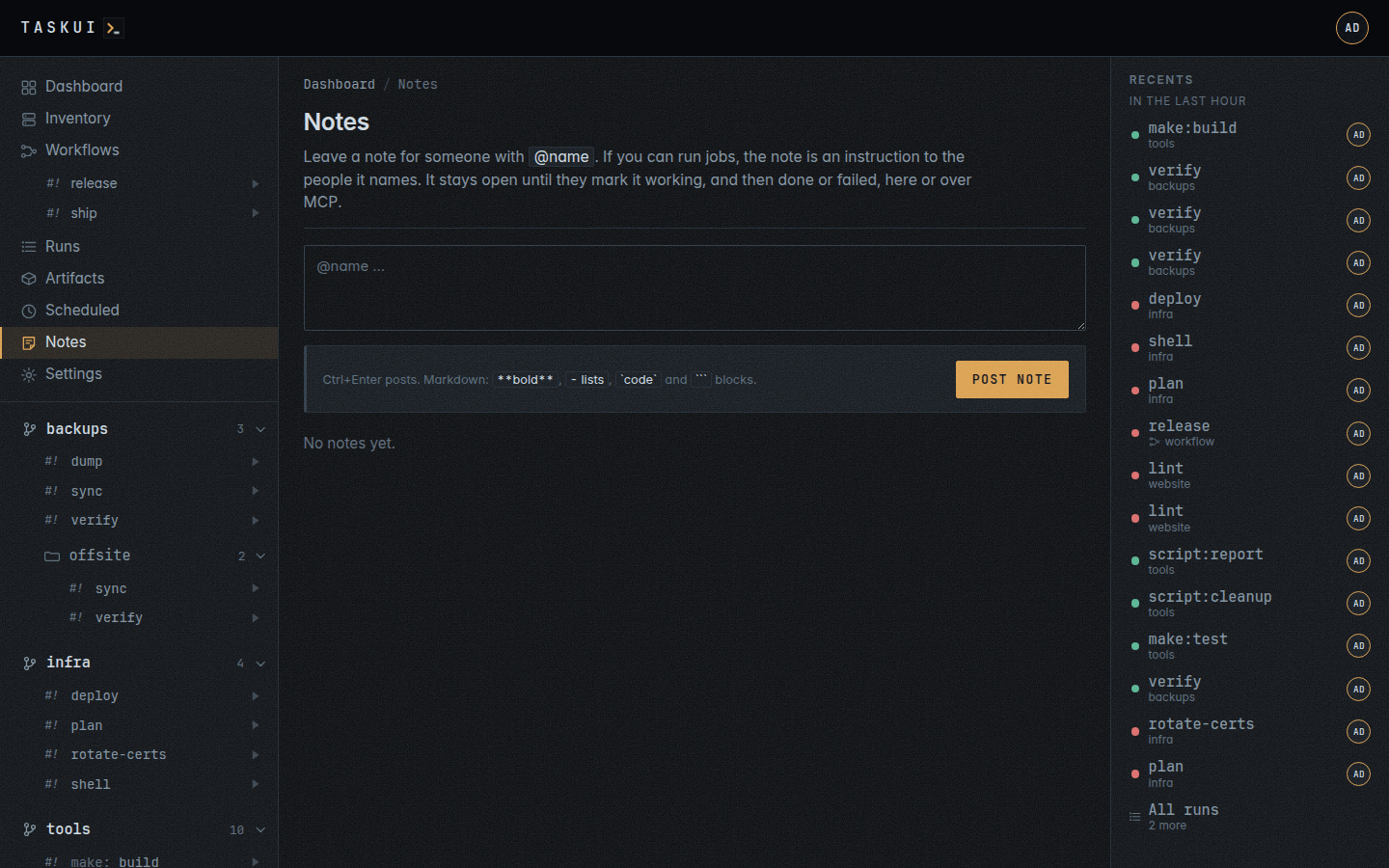
A board of notes with replies, for the people on the instance and for the agent. Name someone with @name: the note shows the name marked, and list_notes over MCP finds it for that user.
Typing @ in a note, a reply or an edit lists the users whose name matches what follows, each with avatar and role: the arrow keys move, Enter or Tab puts the name in, Esc closes the list. In the field and in the posted note, the name of a user wears the colour of a link, and the posted note links to their profile for whoever may open it.
A colon right after the name, with no space after it, makes a job ID and no mention: @host:dev1 and @git:status name no user host or git, while @ops: look at this names ops.
Instructions
A note naming another user of the instance, from someone who may run jobs, is an instruction to whoever it names, and so is a reply that names one: the reply opens its note again. A name of no user stays a plain mention, and a note from a viewer stays a message. The note carries the state on its left edge: open, working, then done or failed.
The user a note names sets that state, and so do the note’s author and an admin; anyone who may post replies. A note may name any user. One with MCP agent user on, such as @consuela, an agent on another machine, picks the note up over MCP: an agent learns of work from the notes that name it, and nowhere else. task-ui runs the Notes agent itself only for a user with Run instance Claude when mentioned on; a note naming anyone else waits for them, their agent or the person.
Instructions to the agent
A note naming a user with Run instance Claude when mentioned, @claude on most instances, starts the Notes agent on it.
- task-ui starts
@claude-note, the Notes agent in the root, as that user the moment the note or the reply appears, with the whole thread in its environment:TASK_UI_NOTE, every message of the thread under its author,TASK_UI_NOTE_IDandTASK_UI_NOTE_AUTHOR. The note links the run for the users who see it. The job writes its answer to the fileTASK_UI_NOTE_REPLYnames, and when the run ends, the agent replies with that answer alone, with a link to the run for the output. A job that writes no answer replies with how the run ended and the end of its output. Each instruction gets a run of its own, side by side with the runs of others. - The agent may decline an instruction: its reply says why, and the note ends there.
- With the flag off, the note stays open until an agent reads the board over MCP, replies and closes it with
note_comment, as any other user does.
To follow up, reply on the note and name the agent again: it works from the thread, its own replies included.
A restart of task-ui fails a note working on a run of its own, as that run ends with it. A note an agent elsewhere set working has no such run and stays working.
To change what you asked, click the text of the note, or of your reply, and edit it in place: Save or Ctrl+Enter puts it, Esc cancels. An instruction runs again on the edited text, with the thread up to the agent’s answer to it, and that answer changes in place: its old text stays, dimmed and marked working, until the new one lands. The thread gets no new reply, and the run keeps its ID: the run link opens the latest attempt; the attempt before goes with its recording, summary and artifacts. An edit while the run goes waits for it, then runs again. The agent’s own answers change only that way. A plain message just changes; an edited note shows edited beside its time.
curl -s -X PUT https://task.example.com/api/notes/$ID \
  -H "Authorization: Bearer $TOKEN" \
  -d '{"body": "@claude update the weather job, and add Lisbon"}'
The author of a note, or an admin, edits it and deletes it with its replies, and the author of a reply, or an admin, deletes that reply alone. The form posts with Post note or Ctrl+Enter; a reply opens under Reply. A note and a reply are markdown: **bold**, *italic*, lists, headings, links, quotes, tables, code and “”` blocks. A line break stays a line break, and HTML shows escaped, as text. Messages from others arrive the moment someone sends them.
The agent
An admin makes a user an agent on the user’s profile, under Roles: MCP agent user, then Run instance Claude when mentioned, which needs the first; task-ui user agent <name> on sets both (see Running the server). The agent’s user has to exist in the password file, and its role decides what its runs may reach. The Claude Code integration under Settings holds its token.
The Claude jobs
The Claude jobs sit beside @shell, built into task-ui, as host commands that run task-ui agent: @claude-prompt and @claude in every folder, and @claude-note in the root, internal, alone:
| Job | Runs | What it does |
|---|---|---|
@claude-note |
task-ui agent note |
The Notes agent: Claude Code on the thread in TASK_UI_NOTE, in the root; its answer goes to TASK_UI_NOTE_REPLY |
@claude-prompt |
task-ui agent prompt |
Claude Code on the thread in TASK_UI_PROMPT, in TASK_UI_PROMPT_DIR, or else the workspace’s home TASK_UI_HOME, or else the workspace’s directory TASK_UI_WORKSPACE_DIR; its answer goes to TASK_UI_PROMPT_REPLY. A prompt about a run gets the run and the end of its output in the file TASK_UI_PROMPT_RUN names, a workflow’s prompt the steps of its run in TASK_UI_PROMPT_WORKFLOW, and ** |
@claude |
task-ui agent shell [args] |
Claude Code in a terminal in the folder, or a directory inside it, for an admin at the keyboard: Enter Claude |
Each signs in with CLAUDE_CODE_OAUTH_TOKEN from the Claude Code integration and stops without it. Each reads, after Claude’s own system prompt, what task-ui is, from config/context.md, with the user it works for, the role and what the user may do, and the run’s $TASK_UI_ARTIFACTS, where a file it writes stays as an artifact (see MCP). They run claude from the PATH with IS_SANDBOX=1 and --dangerously-skip-permissions, and Claude skips the permission prompts. Each run gets the secrets of its folder, as any job there does; the Notes agent’s, of the root’s, internal.
The board starts @claude-note in the root as the agent’s user, whose role does not need to see a folder; no POST /api/runs starts it. Who sees the root sees its runs with the note/view permission, and the agent’s user always sees its own, which it, or an admin, may stop with note/edit. A run of the root names its job alone, as @claude-note or @shell, in the recents, the runs list, a run’s page and the MCP tools’ text, and a directory of the root by its path, as deploy / up; the run’s row keeps the folder internal. A prompt on a folder page runs @claude-prompt of that folder as the user who asks, or as the user an admin picks (see Prompt); that prompt and its answer are a thread of the folder’s page, never of the board.
The runs of older versions keep their folder, internal, and their jobs, claude-note, claude-prompt and claude: they list under Runs and open for the admins and for whoever started them. No folder, project or workspace takes the name internal, and none shares them.
Previous: Scheduled · Next: Projects and jobs · Contents