Scheduled
Jobs and workflows that run on their own, on a cron expression.
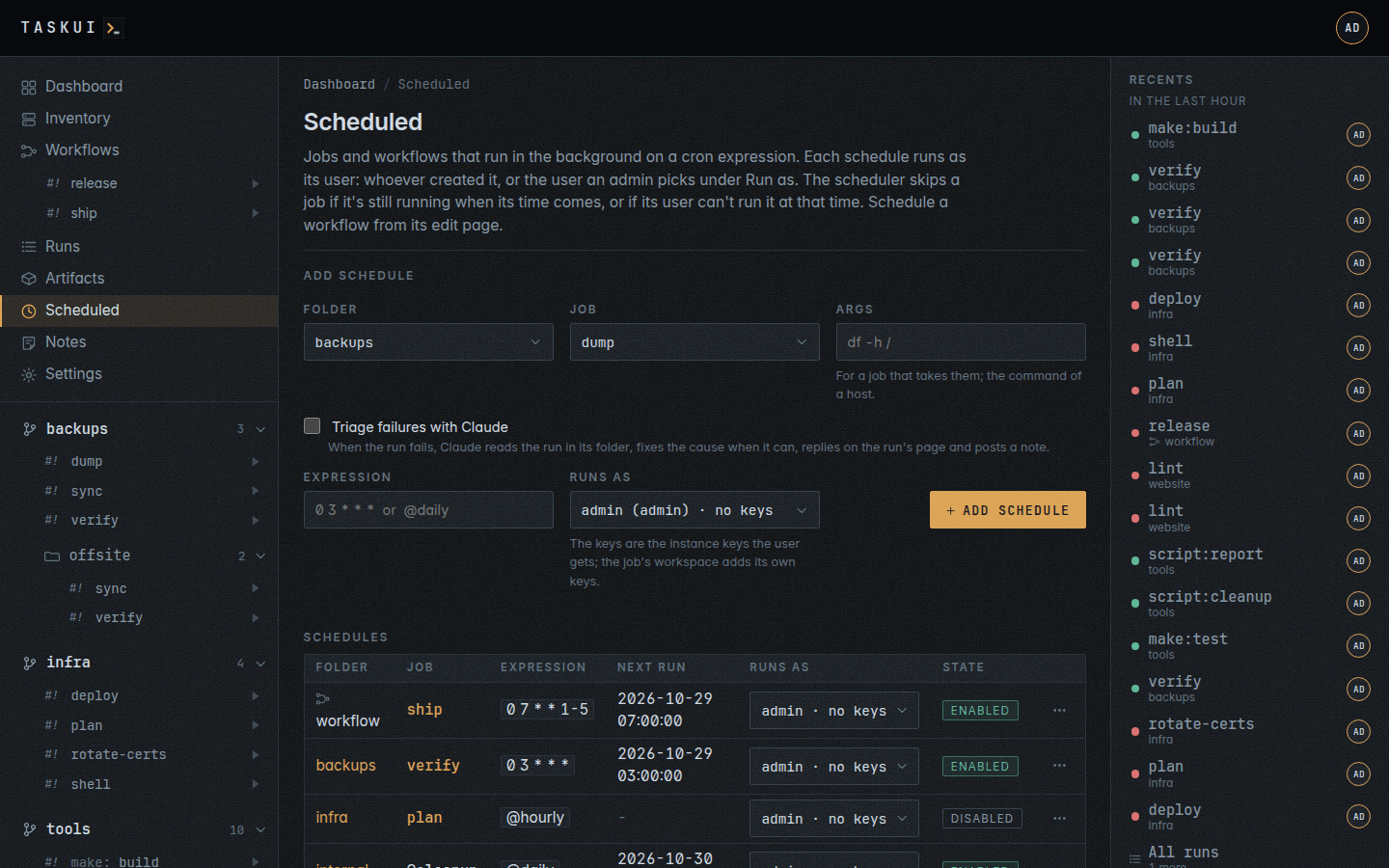
Scheduling a job
A job’s page (open it from the sidebar) has a Schedules section: enter an expression and Add schedule. The Scheduled page lists every schedule with its next and last run, and its Add schedule form takes a folder and job too.
An admin picks who a schedule runs as: Runs as on both forms lists the users, with the admin first selected. Each option names the user’s role and the instance SSH keys the user’s runs get, ops (runner) · keys: deploy_ed25519, or no keys: the keys linked to the user by name or to the user’s role on the Keys page. The job’s workspace adds its own keys to the run, which the list leaves out; pick by the instance keys alone. task-ui checks that the picked user may run the job: they see its folder, hold Run Jobs, and the job’s allow lists name them or their role. If they may not, the form says so and saves nothing. On the lists, the Runs as column shows each schedule’s user with the ⋯ menu; an admin picks another user there, and the schedule saves on the change. Everyone else schedules jobs as themselves.
An expression has five fields, minute, hour, day of month, month and day of week, in the server’s time zone:
| Expression | Runs |
|---|---|
0 3 * * * |
every day at three in the morning |
*/15 * * * 1-5 |
every fifteen minutes on weekdays |
30 6 1 * * |
at 6:30 on the first of the month |
@hourly, @daily, @weekly, @monthly |
as they say |
Month and day names work too (mon-fri, jan).
Args on the Scheduled form go to a job that takes arguments, after --, on every run of the schedule; a job that takes none refuses them.
A schedule runs a command on hosts of the inventory too: @host:<name> of the root, internal, on the host, or @host:* on every host with an ssh login, with the command as its args. With the hosts permission, the job picker of the Scheduled form lists them under Hosts, beside the root internal in the folder picker, and Args takes the command whole. Through POST /api/schedules:
{"folder": "internal", "job": "@host:*", "args": ["df -h /"], "expression": "0 6 * * *"}
Its user needs the hosts permission; @host:* starts a batch, a run a host. The bare @host names no host, and the API refuses it.
Scheduling a workflow
The end of a workflow’s edit page schedules it (see Workflows): an expression alone. The Scheduled page lists a workflow’s schedule among the jobs’: the Folder column says workflow, the Job column names the workflow, linked to its page, and the menu enables, disables and deletes it as it does a job’s. The form on the Scheduled page takes jobs alone. Each run of the schedule runs the workflow as the workflow’s own user when it has one, its Runs as (see Workflows), else as the schedule’s user, with no input, which takes that user’s right to run every step at that time; the scheduler skips the time while the workflow is still running. The Runs as column shows the workflow’s user, with no pick, when it has one: an admin changes it on the workflow. A workflow’s schedule takes no Args and no triage.
Cleanup
@cleanup of the root, internal, is task-ui cleanup: it applies the Data retention table, each row in the table’s order, the oldest items first: the recording files of finished runs, the rows of old runs with their recordings, summaries and threads, old prompt threads, old workflow runs with their steps, the earlier versions of the artifact tree, never the latest of a file in the tree, the reads of the secret read log, the expired tokens and sessions, which go every time, and then the tool history, which it hands to atkins --prune database by database, the instance’s own copy among them. It prints a line per row, what it removed and what stays, a line per tool history database, and after it removed rows it vacuums the database and prints its size before and after. A run in progress or queued, a thread with an open instruction, a workflow run in progress and its own run always stay. With --dry-run as its arguments it prints what would go and changes nothing.
When task-ui first starts it schedules @cleanup @daily as the first admin, once: the schedule is yours to change, disable or delete, and task-ui adds no other. Admins alone run @cleanup, by hand, on a schedule, or as a workflow step.
Triage with Claude
Triage failures with Claude, a checkbox of both schedule forms, has Claude look into a run of the schedule that ends failed or killed. The schedule’s user asks, and needs prompt/edit and the Claude token the folder’s runs get, as a prompt from the folder’s page would; a schedule whose user lacks either skips the triage and logs why. Over the API, triage on POST and PUT /api/schedules switches it; the lists carry it, and the Scheduled table marks a schedule with the triage badge.
The triage is a prompt thread on the failed run’s page, which Claude answers in the run’s folder with the run’s details and the end of its output. Claude reads the job in the folder, finds the root cause and, when the fix is inside the folder, in its code, its pipeline file or configuration it may edit, makes it and commits it. It changes no task-ui setting, user or secret, and runs the job again only when the fix is trivially safe. Its answer ends with one of three results:
| Result | Meaning |
|---|---|
resolved |
Claude found the cause and fixed it in the folder |
not resolved |
Claude found no fix it could make, or the prompt itself failed |
no action |
the cause is outside the folder, or transient |
The thread on the run’s page keeps the full record of what Claude read and did. Once it answered, the schedule’s user leaves a note on the Notes board that names the task, the result and the run:
Attempted triage of failing infra/plan task, result: resolved. Info: https://task.example/runs/01K8ABCDEFGHJKMNPQRSTVWXYZ
One note per triaged run, for every result. A schedule gets one triage at a time, and none for an hour after its last triage ended: a job that keeps failing every minute gets one thread and one note an hour, and the scheduler logs each run it leaves alone. A run that ends ok, or one a person stops, gets no triage. A schedule of @host:<name> or @host:* gets none either, as its runs have no folder to fix in: the scheduler logs that it skipped.
How a scheduled run runs
It starts in the background as the schedule’s user, a workflow’s as the workflow’s user, with their permissions, and shows up like any other run under their name: on the dashboard, in Runs and in Recents; a workflow’s run under Recent runs on Workflows and on the workflow’s page. When the user may not run the job, or a step of the workflow, at that time, because a permission, a folder grant or an allow list changed, or nobody holds the user any more, the scheduler skips the run and logs why. When its time comes while the job or the workflow still runs, the schedule skips that time. Office hours do not gate a schedule: the schedule is the decision.
Disable, in a schedule’s ⋯ menu, stops it without losing it, Enable starts it again. The schedule’s user changes or deletes it, as does anyone else who may run its job: changing takes Allow Edits on Schedules, schedule/edit, deleting Allow Deletes, schedule/delete. When its job leaves the folder, task-ui disables the schedule. A folder that Recursive off in the project or workspace settings hides from the listings keeps its schedules: hidden is not gone.