Workflows
A workflow is a named chain of steps: a one button deploy, such as build, test, push, plan, apply, or a chain of prompts to Claude that fetches something and reasons over it, ending with a summary. A step is a command, a job of any folder or another workflow, a prompt to Claude, or a summary by Claude of the steps before it, in any number and order. The sidebar lists the workflows under Workflows, each with a play button.
Building one with Claude
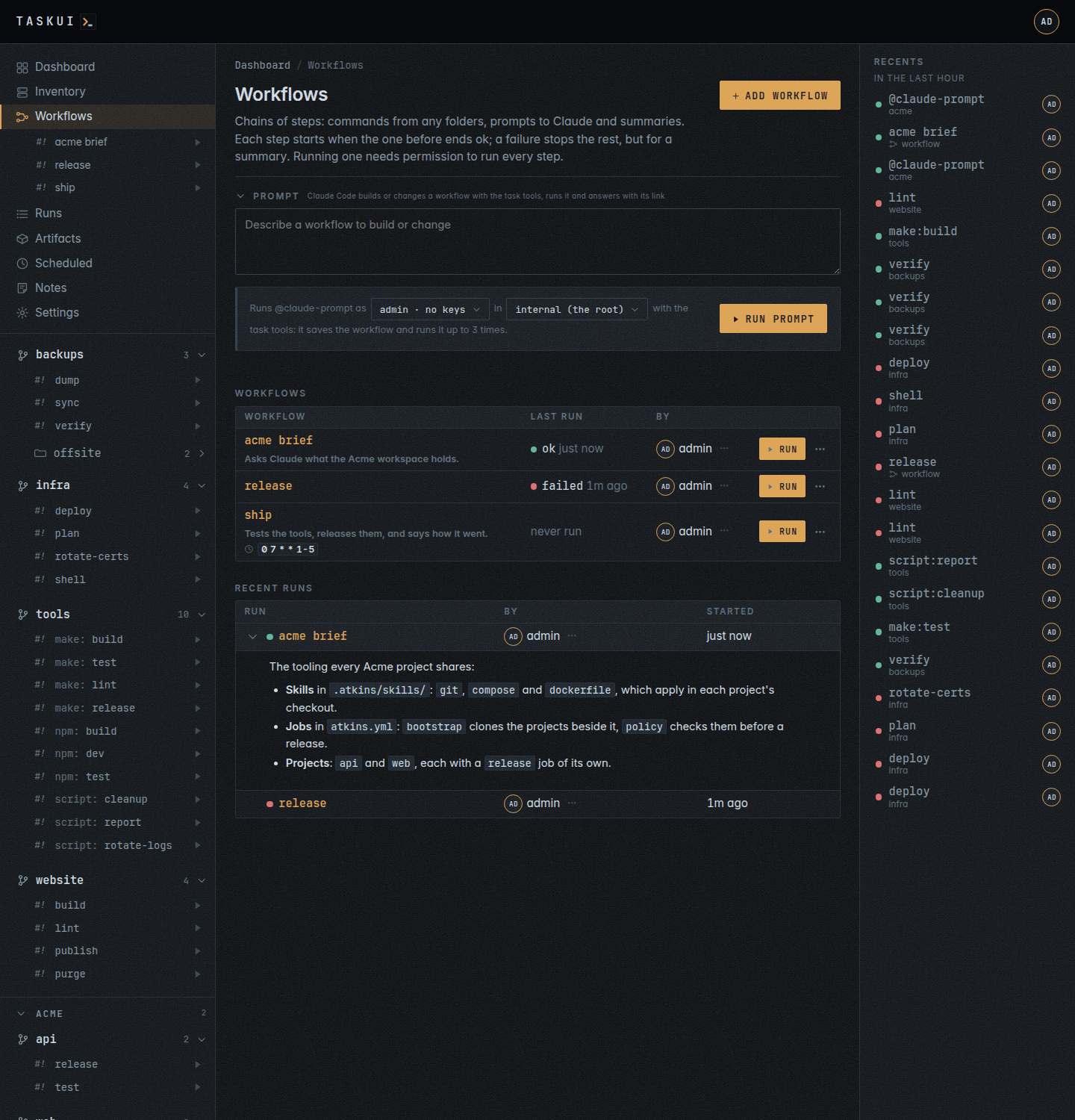
With prompt/edit and the Claude Code integration set up for you, the Workflows page has a Prompt box: describe a workflow to build or change, and Claude Code builds it, as a run of @claude-prompt as you, or as the user an admin picks beside it, in the root, or the folder Run in picks. Claude works with the task tools of MCP, as you: it reads the workflows and jobs there are, saves the workflow with prompt steps and existing jobs before it writes any file, runs it and waits, reads how it went, and fixes and runs it again until it works, at most 3 runs. A prompt step of the workflow runs beside the builder’s own run, as every prompt does. The test run goes while the builder waits, and the builder waits for a run until it ended. It replies in the thread with note_comment (see MCP): the workflow’s link, the run’s link, its steps, and the output of the final step verbatim. Its threads list under the box, apart from the root’s prompts, and a reply in one asks again.
Over MCP, ask_prompt with area workflows posts the same prompt.
The steps
Each step is of a kind, which the editor shows on its card and the API names in kind:
- Command (
job): a job of a folder, picked from the jobs you can see, with its arguments for a job that takes them; a command on hosts of the inventory (see below); or another workflow (workflow), which then runs in its place, all its steps. - Script (
jobof@script): a shell command you write, such asgo get -u ./..., run withbash -l -cin a folder you pick. The command is the step’s one arg; a non-zero exit fails the step. Adding or changing one takes theshellpermission, as running it does. - Prompt (
prompt): Claude answers a prompt in a folder, the root by default, or a directory inside it, with the output of the steps before it. Claude’s answer is the step’s output: the prompts after it read it. - Summary (
summary): Claude summarises the steps before it, with no prompt of yours: task-ui asks Claude the question “Summarize this workflow run.” and the instruction of Run and summarize, one or two short paragraphs and a table of the values worth a glance. A summary is optional; it ends most chains.
A longer chain of prompts is fine: fetch with one prompt, reason over its answer with the next, and summarise at the end.
Running one
Run starts the first step. Each next step starts when the one before it ended ok. The first step that does not end ok ends the workflow, and the rest do not run, but for a summary: a summary step runs after a failed step too, to say what failed and why. A Stop skips every step after it, a summary too. While a workflow runs, the play button in the sidebar becomes an eye: open it to watch.
A step that is off stays in the chain and a run skips it: its row reads skipped, and the steps after it run.
Running a workflow needs the right to run every step in it, and prompt/edit for a prompt or a summary. A workflow runs once at a time; task-ui turns down a second start while it runs.
Run on a workflow with a prompt or a summary opens a field for input first, optional: each prompt reads it after its text, under Input:, and every prompt and summary has it in the workflow context.
An agent runs one over MCP by name: run_workflow starts it, with input for its prompts, and can wait for the end, then says how each step went, the input and the run’s answer; list_workflows and list_workflow_runs show the chains and their last runs, each with its input and answer.
A run is a thread
A workflow run reads like a note and its reply:
- The comment is what the run started with, under who started it: the input of the Run field, or the workflow’s first prompt when the run has no input. A workflow of commands alone run without input says that it ran.
- The reply is the run’s answer, under Claude: the markdown of the last prompt or summary step that answered, Claude’s final message as it wrote it, or its reply in the thread over MCP. A prompt whose run ends without one, only the report of how its run ended, answers nothing, and the reply of the step before it stays. A workflow of commands alone has no answer: its reply is how the run ended, its state, its message and how long it took.
While a run goes the reply shows working, and fills in when the run ends. /api/workflow-runs and /api/workflows/<id>/runs return a run’s input and answer, and the done event of the workflow’s topic carries the answer.
Prompt and summary steps
A prompt or a summary runs @claude-prompt in its place as the user who started the run. Claude gets the workflow context (below) and each step before it: its place in the chain, its folder and job, how it ended, its exit code, how long it took and the end of its output, colours stripped, or a prompt step’s answer. The steps share the output budget of a run’s prompt, the newest step first, and a cut output says so. A step that is off reads skipped. Claude changes nothing unless the prompt names a change, as with a prompt on a run’s page.
The step ends ok when Claude’s run ends ok; a prompt that fails ends the workflow, as a job does. Stop during a prompt stops Claude’s run too, and the workflow run ends stopped.
The pipeline shows a prompt step with the prompt icon, as a prompt in its folder, its prompt under it, a summary with the summary icon, and each with its run once it ran. Their threads show on the workflow run’s page under Prompts, live while Claude works: the question, and Claude’s answer under it. A reply in a thread asks again with the same steps. Saving a prompt or a summary, and running a workflow with one, takes the prompt/edit permission.
Through /api/workflows, a prompt step is {"kind": "prompt", "prompt": "fetch the weather", "folder": "internal", "dir": ""}, a summary step {"kind": "summary", "folder": "internal"}: folder the folder Claude runs in, internal for the root and empty for no workspace, the workspaces root, and dir a directory inside it.
Workflow context
Every prompt a workflow runs, a prompt step’s and a summary’s, starts with a Workflow context block, before the steps’ output: the workflow’s name and link, the run’s number, when it started, who started it and its input, and what the last 3 finished runs of the workflow replied, newest first, each with its date and how the run ended, the run’s answer (see A run is a thread). The block skips a run without one, and it does not count. Each keeps its first 1536 bytes, and a cut one says so; the block takes its share of the run’s output budget. The first run of a workflow reads that there are no earlier runs. So a prompt can stay consistent with what it said before, such as “yesterday I said water tomorrow”. The editor says so under a prompt: Claude also gets the last 3 answers of this workflow.
The Workflows page
Workflows lists the workflows you may see, each with its name, linked to its page, its description and its schedules under the name, each a clock and its expression, its last run, who made it and Run; the row’s menu has Edit for its owner or an admin, and the run going while one runs. The chain of steps is the workflow page’s. Recent runs under it lists the newest 15 runs of those workflows, each with the workflow, who started it and when. The dot by the workflow’s name says how the run went: green for ok, red for failed or killed, grey for stopped, pulsing while it runs; the name links to the run’s page. A run with an answer shows Claude’s answer in full, in markdown, in the row under it, open; the chevron before the run folds it and unfolds it again. A run of commands alone has no answer, only its dot. A run shows when you see every folder its steps ran in.
The workflow page
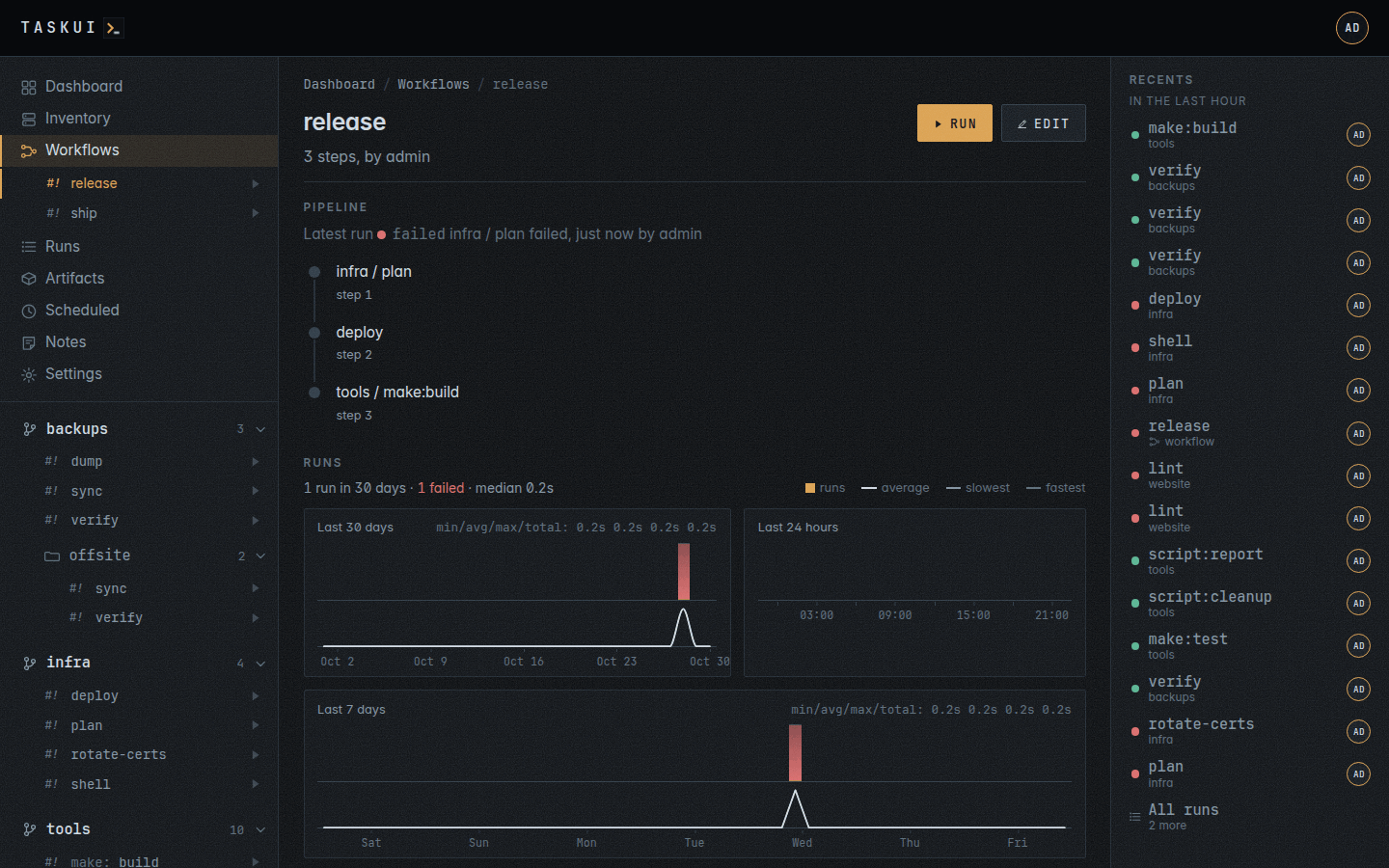
- Pipeline: the steps in the order they run, a step that is off dimmed, a prompt with its text under it. While a run is going, it follows that run live: each step’s state and terminal.
- Runs: the workflow’s activity, its runs of the last thirty days by day and of the last 24 hours by hour, and the duration of its latest thirty (see Runs), then every run of the workflow, newest first: when it started, linked to its page, with the dot of how it ended and the message of a failure, who started it and each step’s run, which opens like any other run. A run with an answer folds it under a chevron; Workflows shows them open. View opens that run in a window, its thread over its steps, each step with its state and the screen it ended on; Ctrl and a click open it as a page. With the Claude Code integration set up for you, a finished run also has Summary: Claude reads every step, its job, how it ended and the end of its output, and writes what the workflow did or where and why it failed, in one or two short paragraphs and a table of the values worth a glance, such as failures per step. task-ui keeps the summary, as for a single run (see Runs). The runs come a page at a time, as on Runs: Page size picks 15, 50 or 100 rows, and Previous and Next under the table page through the rest. The pipeline and its latest run follow the newest run on every page. Stop on a running workflow stops the step that runs and skips the rest.
Making and changing one
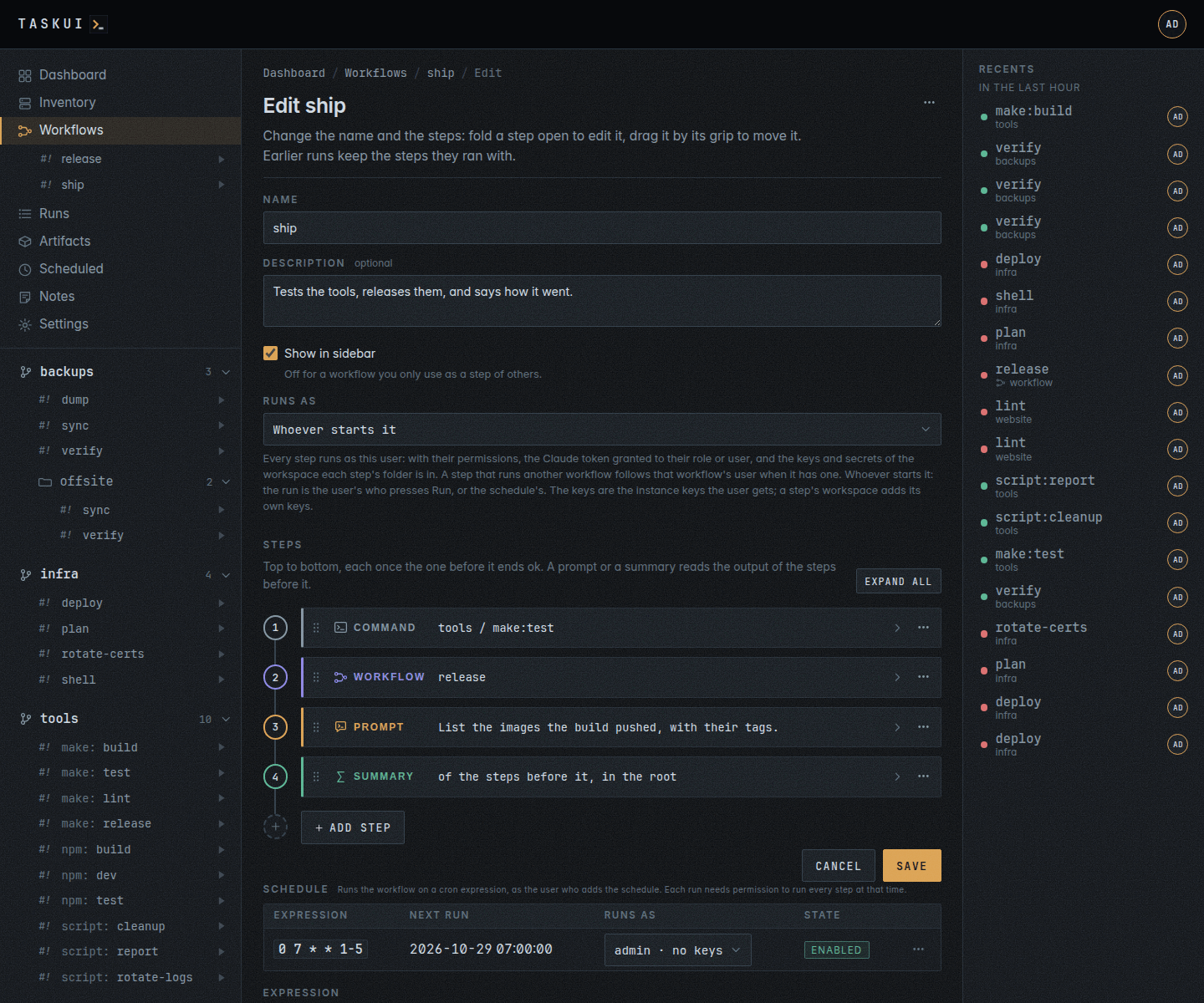
Add workflow on the Workflows page opens the editor on a blank workflow: a Name, a Description, optional, which the workflow’s page and the list show under its name, Show in sidebar, Runs as, the user every run of the workflow goes as, and Runs over, a workspace whose projects every run repeats the steps for. The steps come next, on a rail: a numbered node a step, in the order they run, and the step’s card beside it, in the colour of its kind.
Runs as
A workflow can have a user of its own. Every step of a run, a command, a prompt or a summary, then runs as that user: with their permissions, the Claude token the Integrations page grants their role or user, and the SSH keys and secrets of the workspace each step’s folder is in, through the run’s ssh agent. The run shows under that user’s name, on the Workflows page, the workflow’s page and in Recents, as a run they started. A workflow with no user of its own, Whoever starts it, runs as the user who presses Run, or as the schedule’s user, as every workflow did before the setting.
A step that runs another workflow follows that workflow’s user when it has one: a deploy workflow set to a deploy user runs with the deploy keys whoever runs the workflow that calls it. Without one, the nested workflow runs as the outer run’s user.
An admin picks the user from Runs as in the editor, the current login selected on a new workflow and the saved choice on edit. Each option names the user’s role and the instance SSH keys the user’s runs get, deploy (runner) · keys: deploy_ed25519, or no keys: the keys linked to the user by name or to the user’s role on the Keys page. The workspace of each step’s folder adds its own keys, which the list leaves out. Everyone else reads the field: a workflow they make runs as themself, and one an admin set keeps its user. Who runs it and who owns it differ: the By column of the Workflows page names the owner, and runs as with the user when the workflow has one, as the head of the workflow’s page does.
Running a workflow with a user takes two rights at once: yours, to run every step as before, and the workflow’s user’s, who must be able to run every step at that time, the steps of nested workflows checked as their own users. Run shows when both hold; without it the page says which step keeps it, Run needs malta/deploy / plan, as it does for a step whose folder moved or went. A start the user may not make says which step and whom it refuses. A schedule of the workflow follows the same user (see Scheduling one). A user since deleted leaves the workflow with no one to run as: the start refuses until an admin picks another user, and a nested workflow whose user nobody holds fails its step.
Through the API, user on POST and PUT /api/workflows names the user: an admin names anyone, anyone else only themself (403), a name nobody holds answers 404, an empty name is whoever starts it, and left out the workflow keeps what it has, none on create. Every workflow carries run_as, the name, and run_as_user_id, both empty for one that runs as whoever starts it.
Runs over
Runs over picks a workspace, and each run then repeats the steps for each project of it, a project at a time, in the order of the workspace’s projects. A step whose folder is in a project of the workspace runs in each project in turn, in the folder at the same path inside it: a go get -u ./... script step on malta/apps runs in every project of malta. A project without the step’s job skips that step. A failed step ends that project’s pass, the next project starts, and the run ends failed. Steps outside the workspace, such as a summary at the root, run in every pass as they are. No workspace: the steps run once keeps the steps as written.
A schedule of such a workflow keeps a set of projects up to date with no one at the keyboard: a script step updates the dependencies, a command runs the tests, and a prompt asks Claude to fix what broke, in each project. A step that runs another workflow may not be part of one, and the start refuses a workspace with no projects.
Through the API, runs_over on POST and PUT /api/workflows names the workspace, empty for none, left out unchanged; a workspace you may not see answers 400, as does a workflow step with it; a script step without shell answers 403.
- Add step at the foot of the rail picks the kind: Command, Script with
shell, Prompt or Summary, the last two withprompt/edit. The new card opens on its fields. - A card folds to one line: its kind, and the job and its args, the workflow, the first line of the prompt, or where the summary asks. A click on it opens it on its fields; Expand all opens them all.
- A workflow belongs to no workspace, and every step starts with its Workspace: Internal for the root and the projects at its top, then each workspace that holds a folder you see. The folder list next to it holds that workspace’s folders with a job, every one you see, also the ones the sidebar leaves out: a checkout the workspace’s
.gitignoreignores, a folder below a project or a workspace with Recursive off, a folder hidden from the sidebar. A folder with no job isn’t listed. The list names each folder relative to its workspace,apps/blogformalta/apps/blog, andthe rootfor the workspace’s own. Picking another workspace keeps the folder of the same relative name and its job when that workspace has them; what it lacks goes back to pick one, and a line under the card says so, such asapps/blog is not in Malta.A step you edit opens on the workspace of its folder. Save refuses a step whose folder its workspace lacks and says so under the card, naming the step and the workspace:apps/blog / build: Malta has no folder apps/blog. - Move to a workspace in the edit page’s […] menu does that for every step at once: the form opens with the steps moved, each one the workspace lacks a folder or a job of saying so under its card, and Save keeps it. A step that runs another workflow stays put.
- A Command picks its workspace, then its folder, the job and its arguments; Picking Workflows as its workspace lists the workflows it may run. A Prompt takes its text, its workspace, Asks in, the folder Claude works in, and a directory inside it. A Summary takes the workspace, Asks in and the directory, and shows what Claude gets. Both also list none (the workspace root), for a user who sees every folder: Claude works at the workspaces root, over every workspace, with no workspace’s secrets or keys. The step keeps the folder alone, whose ID names its workspace.
- The grip at a card’s left moves it: drag it, or focus it and press the up and down arrows. The card’s […] menu has Move up, Move down, Disable or Enable, Duplicate and Remove.
- Save sends the whole list. A step that misses something, a command without its job or a prompt without its text, opens with what is missing under it, and so does a step the server refuses, such as a directory Claude cannot work in.
The editor works the same at phone width: the fields stack under each card. Anyone can make a workflow. Its owner, or an admin, edits or deletes it; the runs so far keep the steps they had.
A step’s args field goes to a job that takes arguments, after --.
A step runs a command on hosts of the inventory as @host:<name> of the root, internal, on the host, or @host:* on every host with an ssh login, with the command as its args. With the hosts permission, the folder list of the Internal workspace has internal hosts, and once you pick it the job picker lists them under Hosts, and the args field takes the command whole. Through /api/workflows: {"folder": "internal", "job": "@host:*", "args": ["uptime"]}. A step of @host:* runs on every host at once and ends ok when every host’s run did; running it takes the hosts permission.
Scheduling one
The edit page ends with Schedule: the workflow’s schedules, each with its expression, its next and last run, who it runs as and its state, with Enable or Disable and Delete in the row’s menu, and under them the form that adds one: an Expression (see Scheduled for the syntax). Add schedule saves it. The schedule starts a run of the workflow at each time, as the workflow’s Runs as user when it has one, else as the schedule’s own user, who added it or whom an admin picked on the row, with no input, as Run does without the input field; the run shows under Recent runs and on the workflow’s page like any other. The block’s lead and each row’s Runs as name that user; for a workflow with a user of its own the row has no pick. Changing who runs it means changing the workflow. Scheduling a workflow takes the right to run every step, as running it does, and the scheduler checks the user again at each time: when they may not run a step by then, or nobody holds the user any more, it skips the run and logs why. A run skips its time while the workflow is still running. A schedule of a workflow has no Triage failures with Claude, a job’s run has that; a workflow with a prompt or a summary step reads how its steps went on its own. Deleting the workflow disables the schedule when its time comes.
The workflows list shows each workflow’s schedules under its name, a clock and the expression, and Scheduled lists them among the jobs’ with the workflow where the folder and the job go. Through POST /api/schedules: {"workflow": "<id>", "expression": "0 7 * * 1-5"}; user, folder, job, args and triage stay out of it, user with a 400 that points to the workflow.