Runs
Every run, by anyone, newest first. A dot beside Runs in the sidebar pulses while something runs.
A prompt runs as @claude-prompt of the folder and directory it asks in, such as malta/dockerfiles/@claude-prompt, and lists under that folder here and in the recents. Another user’s prompt runs list with the prompt/view permission; your own always do (see Prompt). A run of the root names its job alone, as @claude-note or @shell, and a directory of the root by its path.
A command on a host of the inventory runs as @host:<host>, a built-in job of the root, one run a host, its command the run’s args. /runs?job=@host:dev1 lists the runs on dev1, /runs?job=@host:* those on every host, and /runs?batch=<id> the runs started together on two or more hosts.
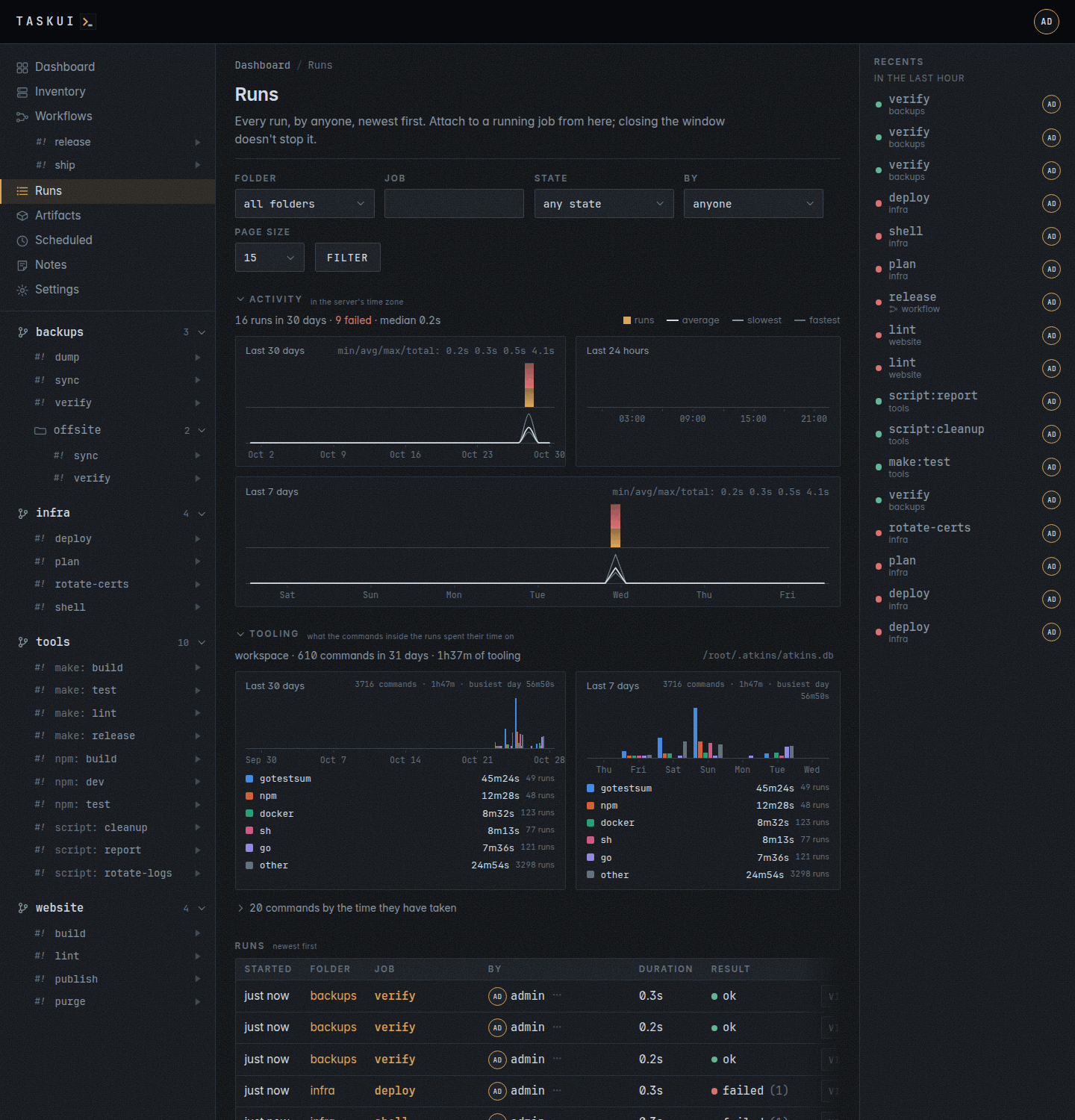
Activity
Above the list, three charts, in the server’s time zone, following the filter:
- Last 30 days, a bar a day, today on the right;
- Last 24 hours, a bar an hour, this hour on the right, with a time marker every six hours;
- Last 7 days, on a row of its own under the two, a bar every three clock hours, 00:00 to 03:00 and so on, 56 of them, the slot this hour is in on the right, each day named at its noon.
Each chart’s head reads min/avg/max/total:, the fastest, the mean and the slowest finished run of its window and their time together.
A bar is as tall as its runs against the busiest bar, split into the runs that ended ok (amber), failed or got killed (red), and the rest, running or stopped (faint). Hover a bar for its counts. Under each, the same days or hours as a line graph of their durations: the average in the text colour, the slowest dimmer and the fastest faint, against the slowest run of the chart, through the middle of each column: a smooth curve on the month, a straight line from slot to slot on the hours and the week, since a curve through a ragged hour reads as a trend that isn’t there. A slot without a finished run sits on the baseline. Hover a column for the average, the fastest, the slowest and how many runs they cover. A line above shows the run count, how many failed and the median duration.
Tooling
The Activity and Tooling headings each carry a toggle that shows and hides the block: the chevron the sidebar’s workspaces, projects and folders fold on, pointing right while the block hides and down while it shows. Every block starts open, and the browser remembers a hidden one for the user who hid it.
Under the activity, what the commands inside the runs spent their time on, as atkins recorded it. A run of a job is one row in the list above; the twenty commands inside it are twenty rows here. This answers a question the run history cannot: how much of a month goes to go test, and whether that has been true all month or only since Tuesday.
A section per database atkins records to, the project first. The project is the checkout the root belongs to, named by its repository, and says what standing in it costs. The workspace is $HOME/.atkins, which every run on the machine records to, and says where a week went across every project. A root that belongs to no checkout has the workspace alone.
Each section holds the activity’s three charts, in the same places and with the same slots, and each tooling chart lines up with the activity chart of the same span above it. A slot nothing ran in is an empty column:
- Last 30 days, a column a day, the shape of a month;
- Last 24 hours, a column an hour;
- Last 7 days, a column every three clock hours, the shape of a week.
atkins lists every command it recorded with atkins --stats --json --all, each with its start time, and the charts count them into their slots. An atkins without --all reports days alone: the section then draws the month and the week a column a day, and no day chart.
In each slot’s column stands a bar per command of the five that took the most time in the window, side by side in the legend’s order, and one for the rest together as other. A command that did not run in that slot leaves its place empty. Every bar measures against the tallest bar of the window. A command keeps its colour in both windows and both sections, and no two commands of one legend share one. The legend under the chart names them, with their time and how often they ran in the window. Hover a bar for its slot, its command, its time and its runs. An atkins too old to report its commands per day draws a bar per tool instead.
A command is its key, as atkins names it: the words up to the first argument that starts with -, at most three, and none that is a path or a value. go test ./... and go test -v ./pkg are go test, docker build -q -t app . is docker build, docker compose up -d is docker compose up, and git clone --depth 1 <url> is git clone. Shell builtins such as set -eu and cd count as nothing.
Under the charts, Latest commands lists the twenty newest, newest first: the time, with the weekday before an earlier day’s, the command in its chart colour and its job, how long it took, and ok or failed (hover for the exit code).
The toggle under the list opens the commands themselves, by total time: the key, its tool, how often it ran, its total, its average, its slowest run, how many failed and when it last ran.
The two blocks follow the runs: when a run ends, the page fetches itself again, at most four times a minute, and redraws Activity and Tooling in place, without a reload. task-ui keeps what atkins answered for a minute, and asks again as soon as a database it read from changes. The commands of the run that ended are in the redraw.
A section is there when its database has something recorded, and absent when it has not. The file each reads sits at the end of its summary line. See Statistics for what atkins records, the two databases it records to and the 31 day window it keeps.
The list
Each row is a run: when it started, the folder and job, who started it, how long it took and how it ended. Filter narrows it by folder, job, state and who started it, By; ?batch= in the address keeps the runs of one batch. The ⋯ next to a name opens that user’s menu: their profile, their runs, and their permissions for those who may change them. A run in progress has Attach, a finished one View.
A run waits, queued, its dot a ring, behind the run of its job before it: a command on a host that still runs one (see Inventory); or for a free slot, while as many runs go as the machine has CPUs (see Runs at once). It starts once that run ended or a slot frees, and its page says so; Stop takes it out of the queue, stopped. A queued run the instance restarted before it ran ends failed, its page saying “the instance restarted before it ran”.
The list shows a page of runs at a time. Page size picks 15, the default, 50 or 100 rows. Under the table, Next goes to older runs and Previous back to newer ones; both keep the filter and the page size. A page holds only the runs of the folders you may see, and no hidden run leaves a gap in it. The list adds a run that starts on top of the first page only; on a later page, the rows in it still update in place.
With the Claude Code integration set up for you (see Settings), a finished run also has Summary: Claude reads the end of its output, up to 2000 lines, and writes one or two short paragraphs on what it did and how it ended, the cause when it failed, then a markdown table of the values worth a glance, such as versions, images, counts or durations, when the output has any, in a window. task-ui keeps the summary by run. The next Summary of that run, by anyone, shows the kept one at once, without asking Claude again.
The run window
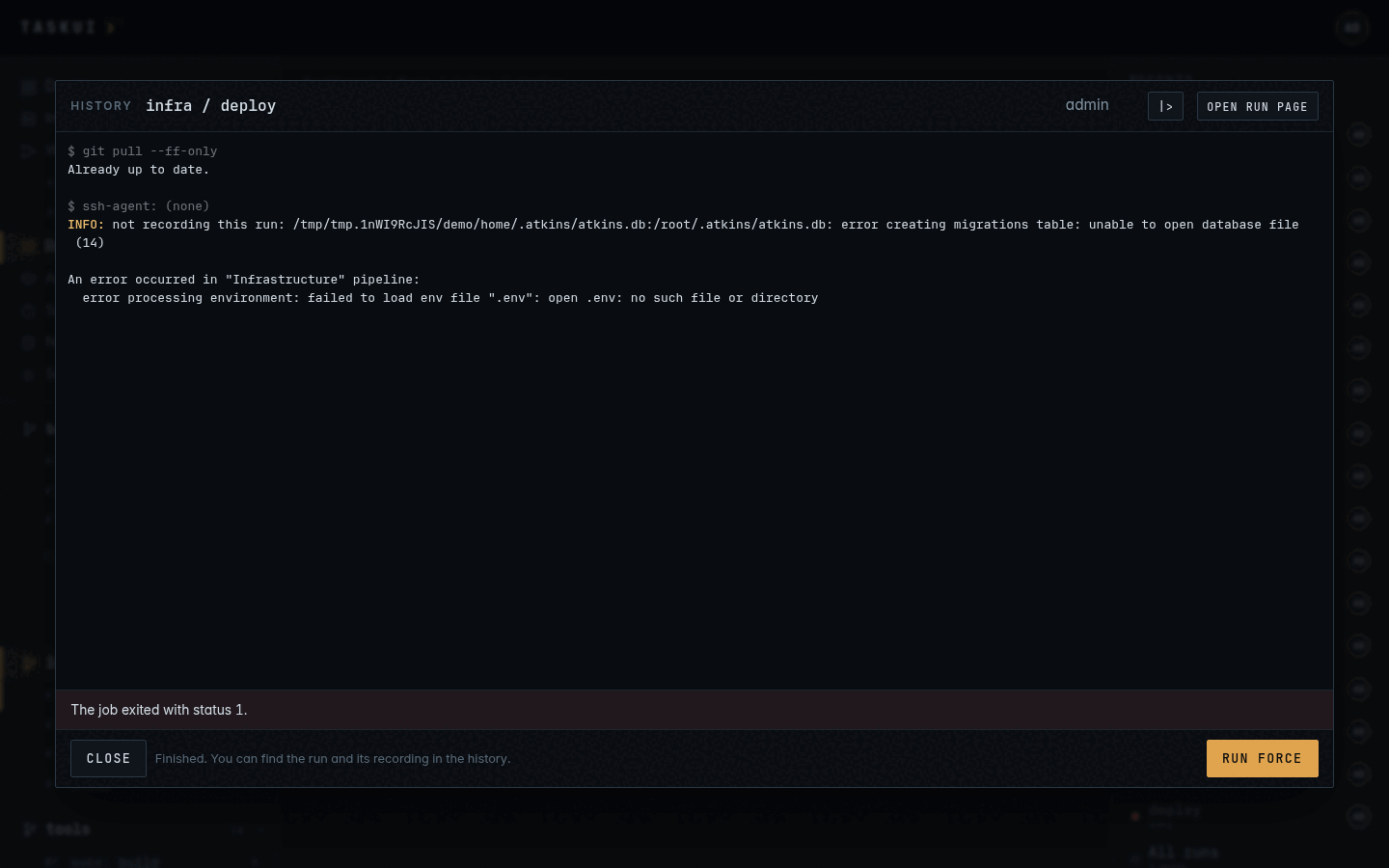
Starting a job, or attaching to a run, opens the run window over the page: the run’s terminal, live.
- The run goes on without the window. Closing it detaches; the run keeps running, and the dashboard, this list or the run’s page open a window on it again. A window that comes back gets the tail of what it missed.
- Runners type into an interactive job. Input goes to the job, and the terminal takes the window’s size. A viewer can only watch in the window.
- Take input answers a job that takes no input but waits on a prompt, such as the ssh prompt to trust a host. Every run has a terminal on its input, and what you type reaches the process. With Allow interactive mode, which admins hold, the button sits in the foot of a running run’s window: your keystrokes go to the process and the header says
( > input on )until Release input. The run’s recording names who took input first, and a window opened later shows it in the header. - Stop signals the job to end (SIGHUP and SIGTERM, then SIGKILL after
TASK_UI_GRACE, ten seconds) and records it asstopped. Kill ends it now, askilled. - Run again starts the job once more when it has ended.
- Open run page in the window’s header goes to the run’s page.
- A job can name itself. A terminal title the job sets, such as
printf '\033]0;building images\007'(OSC 0 or 2), shows beside the job’s name in the window’s header and in the browser tab while the window is open, and changes as the job sets another. An empty title clears it. The dashboard and this list show it too, and the run keeps the last one when it ends.
The window follows a chain
Some runs come in a chain: |> Summarize, the job’s run and then Claude’s summary of it; a workflow run, the runs of its steps in order and then its prompt’s; a command on every host, a run a host and the summary with Run and summarize. A window on a run of a chain keeps following it: when the run ends and the next one starts, the window moves to it, without a click, and the terminal streams it. View on any run of a chain opens the newest run that started, the chain’s last page; ‹ Previous goes back from there. The foot of the window, left of its hint, holds the chain’s paginator:
- ‹ Previous opens the run before this one, played from its recording once it ended.
- Run 2⁄3 says where the run stands, of how many the chain holds;
Run 1/…while that is not known yet. - Next › opens the run after this one. It stays disabled while the chain waits for the next run to start, and goes away on the last run of a chain that is complete.
The hint says the chain goes on while it does, such as “Claude’s summary of it streams in this window next”, and reads “Finished” once the chain is complete. A window on a run of no chain has no paginator. GET /api/runs/<id> carries the chain as chain, and the attach socket sends it as a chain message (see the API).
Report, beside the paginator, shows on a run that has a report: Claude’s run on a prompt once it answered, such as the summary’s Run 2/2, and a run Claude summarized. It opens the run’s report page.
A run’s report
/runs/<id>/report shows Claude’s markdown of a run as a document: the summary of a run, or what Claude’s run on a prompt replied, with the question above the reply when the question is no summary’s. Its head names the job, when the run started, who started it and who asked, with links to the run, Claude’s run and the job. The page reads the reply Claude saved and shows no output, spinner or tool call of the terminal. Report on a run’s page, in the run window and under a summary on a job page all open it. The page takes prompt/view and a run you see; GET /api/runs/<id> names it as report when the run has one.
A finished run stays attachable, its last frame in memory, for TASK_UI_KEEP, fifteen minutes; after that it opens as history: its whole recording played into the window, with how it ended, and Run again for whoever may run it.
One run per job
A job runs once at a time across the instance; the same target of two directories in one folder, such as build in images/ and in docs/, is two jobs. The Claude jobs of a prompt and of the Notes agent, @claude-prompt and @claude-note, are each a Claude session of their own and go side by side: no prompt waits for another. Starting any other job that runs already attaches to the run in the way. Run force kills that run and starts again; out of its workspace’s hours it also asks why, and keeps the reason with the run (see Workspaces).
Runs at once
Different jobs run side by side, as many at once as the machine that runs task-ui has CPUs. A run that comes while the runs fill every slot waits, queued, and starts when a run ends, in the order the runs came; the runs list, the dashboard and the run’s page say where it stands in line, and Stop takes it out. A terminal takes no slot: @shell, @claude and a job marked interactive: true idle on their input, and an open shell never holds up a run. A prompt’s run and the Notes agent’s do work and take one.
The line for a slot is the backlog, 20 runs per CPU, 80 on a host with 4 CPUs. A flood of requests never piles up runs without end. An admin sets another length on the Instance page, Backlog length; empty is the automatic one, and a change applies to the next start. A run that comes while the backlog is full does not start: the page says so, POST /api/runs answers 429 “80 runs wait for a free slot already; start it again later”, and run_job over MCP ends in that error.
From an agent
An agent starts runs over MCP as the user of its token: run_job starts one and can wait for it to end, list_runs and get_run read the history and the end of a run’s output. Such a run is like any other: this list shows it under that user, and anyone allowed attaches to it.
A run’s page
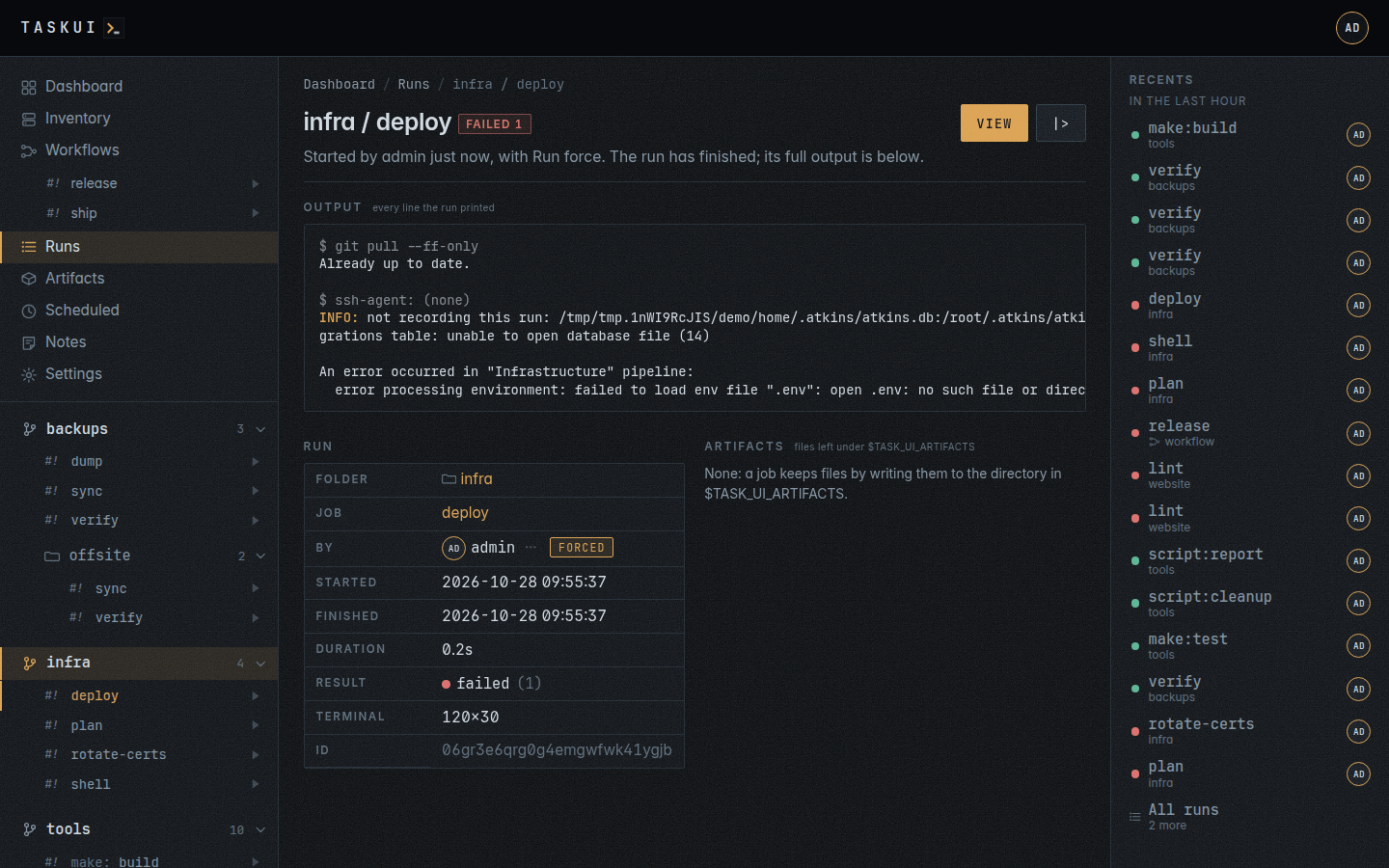
/runs/<id> is one run, to link to:
- Output: every line the run printed, in its colours, from the first to the last, scrolling inside the block. The block replays the recording, and what redraws itself, a progress bar or a pipeline tree, shows its last frame.
- Run: folder, job, who and when, how long, how it ended, and the reason for a run forced out of hours. A run of a directory’s job names the directory, linked to its page, and a run given arguments lists them, one each. The run’s environment stays hidden, a secret’s value and its name alike: the secret’s read log names the run (see Settings and Security).
- Artifacts: the files the run left (see Artifacts).
- |> replays the recording in the run window as the run printed it, idle gaps and all, under a blinking
( * recording )beside the title, with Pause and Restart. It only reads the recording: no run starts, the recents stay as they are, and typing goes nowhere. A finished run’s window header has the same |>, and its row in a list has Replay the recording in its ⋯ menu.
Once its recording expires under the Data retention settings, a run keeps its page, its details and its artifacts: Output says the recording expired, |> goes, its frame says so, and a prompt about the run reads that the run has no output any more.
While the run is in progress the page shows its terminal as it looks now, and Attach, Stop and Kill instead.
A prompt about a run
With the prompt/edit permission and a token in the Claude Code integration, a finished run’s page has a Prompt box under its output: ask why the run ended the way it did, or for a fix to its job or pipeline. The prompt runs @claude-prompt as you, or as the user an admin picks in the box’s foot, in the run’s folder, or the directory inside it the job ran in, as a folder’s prompt does (see Projects and jobs). Claude gets the run with the question: its ID, folder, directory and job, who started it, how it ended and its exit code, when it started and how long it took, the job’s command, and the end of its output as text, marked as cut when longer than either limit:
| Output | Limit |
|---|---|
| Lines | the last 2000 |
| Size | 256 KiB |
For a question that names a fix, Claude makes it in the checkout, commits it to main, pushes, and names the change in its reply.
The run’s page lists its threads, newest first, as they get answered: the run’s history of questions and fixes. They stay off the folder’s prompt box. Reply asks again about the same run, and a click on a question edits it and runs it again, as on a folder page. With prompt/view alone you read the threads, without the box. A prompt’s own run has no prompt.
curl -s -X POST https://task.example.com/api/prompts \
  -H "Authorization: Bearer $TOKEN" \
  -d '{"run": "<run id>", "prompt": "why did this run fail"}'
curl -s "https://task.example.com/api/prompts?run=<run id>" \
  -H "Authorization: Bearer $TOKEN"
Run and summarize
|> Summarize beside Run on a job’s page runs the job as Run does, in its window, and when the run ends, in any state, task-ui asks Claude about it on the run’s page, as you: a thread whose question reads “Summarize this run.”, answered in the shape of a Summary, one or two paragraphs and a table of the values worth a glance. Claude gets that shape with the question, and changes nothing. The thread shows under the output as it gets answered, and Reply asks more about the run. The window moves on to Claude’s run when it starts, Run 2/2, and streams the summary as Claude writes it (see The window follows a chain). The button shows with prompt/edit and a Claude Code token, on jobs that end on their own: not @shell, @claude or an interactive job. Run again in the window brings another summary.
Summarize, in the ⋯ menu of a row of a job page’s runs, starts the same thread for a run that ended without a summary, with the same question; the window opens on the run and moves on to Claude’s run, Run 2/2. It shows with the same rights as |> Summarize; while Claude writes, the row reads “summarizing”. Once Claude answered, a Summary line under the row opens to the summary, rendered as markdown: headings, lists, tables and code, with any raw HTML in it shown as text. The API takes Summarize as a prompt about the run that reads the question:
curl -s -X POST https://task.example.com/api/prompts \
  -H "Authorization: Bearer $TOKEN" \
  -d '{"run": "<run id>", "prompt": "Summarize this run."}'
task-ui waits for the run in memory: when the server restarts before the run ends, no summary comes. The API takes summarize on a run:
curl -s -X POST https://task.example.com/api/runs \
  -H "Authorization: Bearer $TOKEN" \
  -d '{"folder": "malta", "dir": "dockerfiles", "job": "@git:status", "summarize": true}'
curl -s "https://task.example.com/api/prompts?run=<run id>" \
  -H "Authorization: Bearer $TOKEN"
A workflow summarises itself the same way when its prompt is a summary: Summarize in its editor fills the prompt with this shape (see A workflow with a prompt). Its thread lists by the workflow run:
curl -s -X POST https://task.example.com/api/workflows/<id>/runs \
  -H "Authorization: Bearer $TOKEN" \
  -d '{"input": "for the 1.2 tag"}'
curl -s "https://task.example.com/api/prompts?workflow_run=<workflow run id>" \
  -H "Authorization: Bearer $TOKEN"
What a job gets
A run starts in its folder, or in the directory inside it whose job it runs, as a login shell, with:
TASK_UI=1,TASK_UI_USER,TASK_UI_FOLDER,TASK_UI_JOB,TASK_UI_RUN_ID, andTASK_UI_ARTIFACTS, a directory for its files;TASK_UI_ROLE, the role of whoever started the run, andTASK_UI_PERMISSIONS, what that user may do in a line, asnote/view, note/edit, run; everything else is denied;TASK_UI_WORKSPACE, the name of its workspace,internalat the top of the workspace folder, andTASK_UI_WORKSPACE_DIR, its directory, the workspace folder forinternal;HOMEandTASK_UI_HOME, the workspace’s home,<root>/<workspace>/home, with the server’s registry logins, Claude Code settings, cache andGOPATHkept in use, andATKINS_DB, the home’s history with the instance’s copy as its mirror;TASK_UI_HOST_PWD, its directory as the docker host sees it, andTASK_UI_HOST_DATA, the data directory there, for adocker run -v "${TASK_UI_HOST_PWD:-$PWD}:/src"that the host’s daemon resolves (see Running the server);- the secrets of its folder and its workspace’s shared secrets, never another workspace’s (see Settings);
TASK_UI_APIandTASK_UI_RUN_TOKEN, fortask-ui get-secret NAME, which prints a secret of the folder (see Secrets in scripts);- of the server’s own environment, what the Parent environment passes: the base variables alone by default, every variable but the sensitive ones, or every one;
- an ssh agent, through
SSH_AUTH_SOCK, with the instance keys linked to the role or the name of whoever started the run (see Projects and jobs), and the SSH keys of its workspace its links let through (see Workspaces); a host command gets every instance SSH key, as the inventory signs in with them; the terminal says which, or(none).
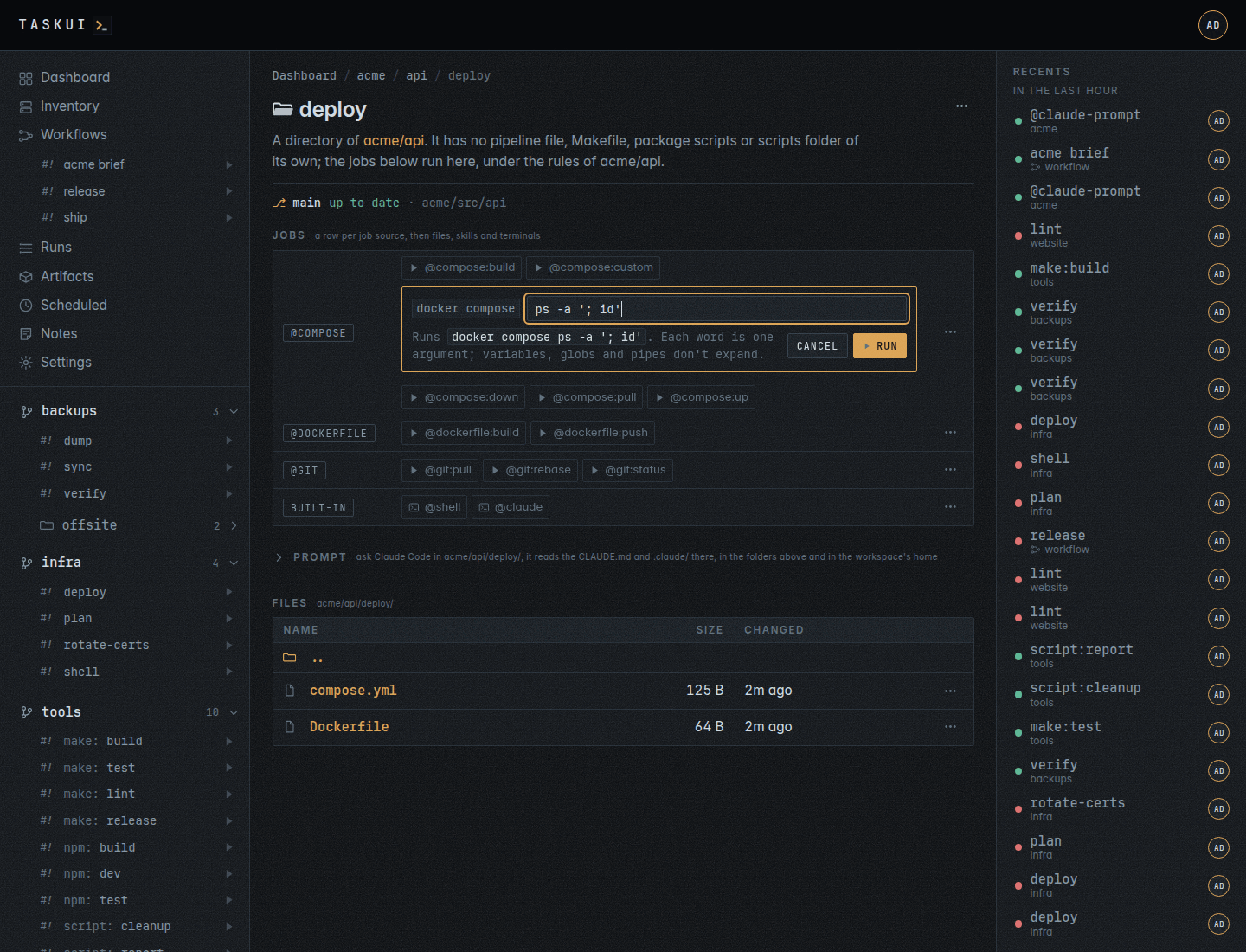
A job that takes arguments, an atkins job with args: true, gets them after --, as argv: POST /api/runs with "args": "ps -a" runs atkins -f atkins.yml custom -- ps -a. The line splits as a shell splits words, with quotes and backslashes, and nothing in it expands: "; id" reaches the job as one argument, ; id. Every other job refuses arguments.
On its page, Run… of such a job, such as @compose:custom, opens a field under it first. The field starts with the command the arguments follow: the exec: step of the job, such as docker compose, or the job’s own argv and --. Below it, task-ui shows the whole command as each word reaches it, docker compose ps -a '; id', or says a quote does not close; Run sends the line, Esc or Cancel closes the field. The job’s exec in GET /api/folders is the same command. A link to the page with #args=<job>;<line>, such as /f/acme/api/deploy#args=@compose:custom;ps%20-a, opens the field of that job on load with the line typed in.
Before the job, a folder in a git checkout pulls it, in the run’s own terminal; when the pull fails, the run fails with it. A folder in a workspace whose home is a checkout pulls the home first, then its own. A shell, @shell, skips the pull: it opens on the checkout as it stands.