Artifacts
The files runs leave behind: build output, reports, coverage, images, anything a job wants kept. task-ui gathers them into one tree with every run’s files side by side, and keeps the versions a later run replaced.
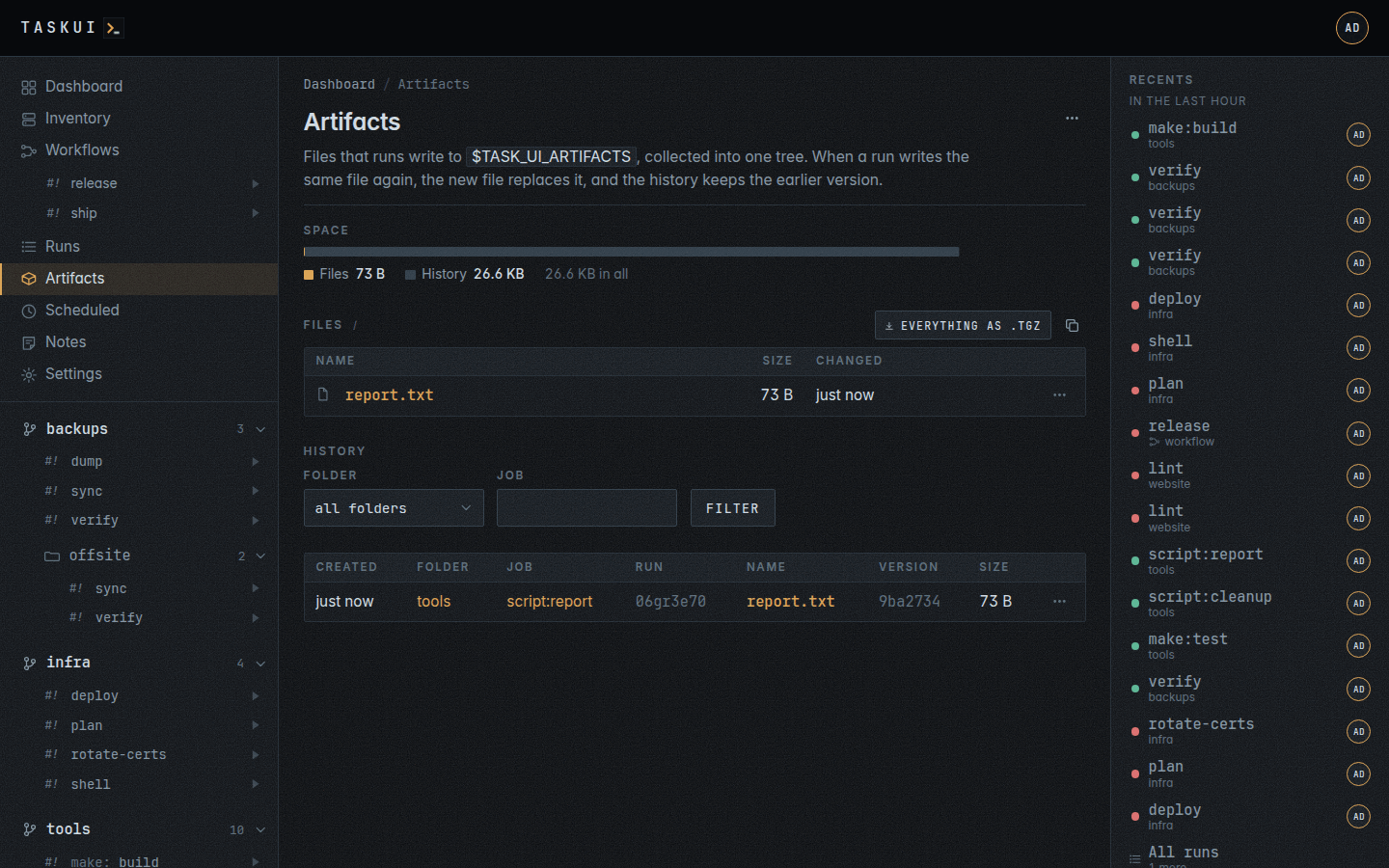
Leaving one
Every run gets an empty directory of its own in $TASK_UI_ARTIFACTS. A job that writes files or directories there leaves artifacts:
go build -o "$TASK_UI_ARTIFACTS/app" .
mkdir -p "$TASK_UI_ARTIFACTS/coverage" && cp coverage.html "$TASK_UI_ARTIFACTS/coverage/"
When the run ends, task-ui moves the files into the artifact tree, at the same paths. A job that writes job1.txt and another that writes job2.txt leave both at the top of the tree. A later run that writes job1.txt again replaces it there, and the history keeps the version before. A report a job writes on every run stays current. The run’s own directory goes, and nothing carries over into the next run’s.
The page
- Space: the bar shows what the tree takes: the latest files, and the history of earlier versions.
- Files: the latest version of every file, a directory at a time, as a table of names, sizes and times. A directory opens; a file opens in the preview window: an image scaled to fit, markdown rendered as a page, plain text, and for anything else its type and the download. The window picks among the versions the runs wrote, newest first, and downloads the one it shows. Ctrl and a click open the file on its own. Each row downloads its file, or its directory as a
.tgz, and copies the link to it. The button over the table downloads the open directory, or everything, as a.tgz, and its link copies the same way:/artifacts/<directory>.tgz, and/artifacts.tgzfor the whole tree. - History: every version a run left, newest first, with the folder, job and run it came from, or the user who wrote it over MCP or the API, filtered by folder and job. A name opens that version in the preview window. A run’s page lists its own.
You see the files of the folders you may see, in the table and in a .tgz. With Allow Edits on Artifacts, artifact/edit, you delete a file or a directory from the tree, with the button on its row: the history keeps its versions, and the preview window still shows them. With Allow Deletes on Artifacts, artifact/delete, you delete a record, and Delete all, in the ⋯ menu at the top right, deletes every file, its history and every record.
Writing one
An agent outside task-ui writes into the tree too, over MCP with write_artifact, or with PUT /api/artifacts/files/<path> and the file as the body: a relative path, with no .. and no dot file, within the size limit the API names. The file replaces the version at that path, which the history keeps, as a run’s file would. Its record has no run, folder or job: the History names the user who wrote it, and whoever sees artifacts sees it. list_artifacts lists a directory and read_artifact reads a file, the latest version or an older one. Writing takes Allow Edits on Artifacts, artifact/edit, which the runner role holds; with it a runner also deletes a file from the tree (see MCP).
History
The tree is a git repository: each run that leaves files is a commit. Once the history holds more commits than TASK_UI_ARTIFACT_HISTORY (50 unless set), task-ui squashes it to one commit of the latest files, and the earlier versions and their records go. See Running the server.
Artifact history on the Data retention settings page keeps the earlier versions for an age and within a size: @cleanup drops the oldest commits of the history, and the versions only they held, until both rules hold. The latest version of every file in the tree stays.